
Intercom alternative: an AI-agent-first comparison
 Communicate.so
Intercom alternative for AI-first teams: compare an AI-agent platform against an incumbent suite on resolution, handoff, and price.
TL;DR: An Intercom alternative is worth evaluating when your support has shifted from humans-with-a-helpdesk to an AI agent that resolves the bulk of volume. Teams usually start the search for one of three reasons: the bill climbs faster than the value, the suite has more surface than a small team can run, or they want an AI-agent-first tool rather than AI bolted onto a ticketing product. This guide compares the two archetypes fairly, shows where an incumbent suite like Intercom is genuinely strong, and lays out how to score an AI-agent platform against it on resolution, handoff, pricing, and security.
Intercom is a capable product, and this is not a takedown. It is a mature suite that a lot of teams run happily, and if it fits your operation and your budget, switching for its own sake is a waste of a quarter.
The useful question is not "what is the best Intercom alternative." It is whether your support has changed shape enough that a different kind of tool now fits better than the one you are on. When an AI agent is resolving most of your volume, the thing you are paying for and the thing you actually use start to drift apart, and that gap is what sends teams looking.
This guide is written for the person who has to make the call: a founder, a support lead, or an ops owner weighing an incumbent suite against an AI-agent-first platform. It covers why teams look, where Intercom is strong, how to compare the two archetypes without a fabricated spec sheet, how the pricing models differ, what migration actually involves, and the security questions that matter when you move data from one vendor to another.
Why teams start looking for an Intercom alternative
Nobody replaces a working support stack on a whim. The search almost always starts because something concrete changed, and the tool stopped matching the job. Three reasons come up again and again, and they are worth naming plainly because they point at different alternatives.
Cost that grows faster than value. Teams often cite the bill as the first trigger, especially as a suite adds seats, add-ons, and usage-based line items on top of a base plan. The frustration is rarely the headline price.
It is that the cost keeps climbing while the AI does more of the work, so you feel like you are paying human-era prices for an AI-era workload.
More surface than a small team can run. A broad suite is a strength for a large support org and a burden for a team of three. When most of the modules sit unused, the product stops feeling like an advantage and starts feeling like overhead you configure around.
Complexity that a bigger team would staff for becomes a tax on a smaller one.
Wanting AI-agent-first, not AI-added-on. Some teams want the agent to be the product, not a feature grafted onto a ticketing tool. That is a real architectural preference, not a marketing distinction, and it changes how resolution, handoff, and analytics are designed.
If you want AI to resolve the majority of conversations rather than suggest replies to humans, an AI-first tool is built around that goal from the start.
This shift is not a fad, and the demand for it is measurable. Gartner has projected that by 2029, agentic AI will autonomously resolve 80% of common customer service issues without human intervention (Gartner). A stack designed for humans doing all the work will feel increasingly mismatched against that trajectory, which is exactly the mismatch teams are reacting to.
What AI-agent-first actually means, versus an incumbent suite
 Communicate.so
An incumbent suite and an AI-agent-first platform are two different design centers, and the difference is not about which has more features. A suite like Intercom starts from a full customer communication platform, messaging, ticketing, a help center, product tours, and outbound, then adds an AI layer on top. An AI-agent-first tool starts from the agent and builds the shared inbox, analytics, and handoff around it.
The practical effect shows up in defaults. In a suite, AI is one capability among many, and it inherits the assumptions of a product built for human agents working tickets. In an agent-first tool, resolution is the whole point, so grounded retrieval and a clean handoff are the core of the product rather than an option you switch on.
Neither design is universally better, and pretending otherwise is how you end up with the wrong tool. A suite is the stronger fit when you genuinely use the breadth, run a larger team, or need the ecosystem and integrations a mature platform accumulates. An agent-first platform fits when you want the AI agent to carry the load and you would rather have a smaller, sharper product than a broad one you half-use.
It helps to think in archetypes rather than brand names, because products move and feature lists go stale. The incumbent-suite archetype optimizes for breadth and a large-team workflow. The AI-agent-first archetype optimizes for resolution, a tight handoff, and a small-team operating model.
Most real tools sit somewhere on that spectrum, and knowing where a given tool sits tells you most of what you need before a demo.
Where Intercom is genuinely strong
A fair comparison names the incumbent strengths first. Intercom has been in this market a long time, and that maturity is real. Any team evaluating an alternative should weigh these honestly rather than pretend they do not exist, because switching away from them has a cost.
Breadth is the obvious one. A mature suite like Intercom bundles messaging, a help center, ticketing, product tours, and outbound in a single platform, which is genuinely convenient if you use most of it. Consolidating several tools into one vendor is a real operational win for teams big enough to justify it.
Ecosystem is the second. Years in the market buy a deep catalog of integrations, a large partner network, and a lot of institutional knowledge that shows up in documentation, hiring, and community. You can read broad user sentiment for any incumbent on a review platform like G2 before you decide, which is a signal a newer tool cannot offer at the same scale.
Scale for large teams is the third. Suites are built with role hierarchies, routing rules, workload management, and reporting designed for support orgs with dozens of agents. If that describes you, an incumbent suite is meeting a need an early-stage agent-first tool may not have built out yet.
The right frame is not that Intercom is weak, it is that its strengths are aimed at a different team than the one an agent-first tool serves best.
How to compare an AI-agent platform against an incumbent suite
 Communicate.so
Compare on properties you can check, not on feature counts. The trap in this category is scoring the longer feature list as the winner, when most of those features do not touch the outcome you care about. Weight the criteria below by what your operation actually needs, and score each tool on your own material rather than the vendor's demo.
Resolution over deflection. The number that matters is the share of conversations a customer confirmed as solved, not the share the tool closed without a human. Deflection counts an abandoned or wrongly answered conversation as a win, which flatters every product equally.
Ask both archetypes to report resolution on your real questions, and treat anything they cannot show as absent.
Handoff quality. A conversation the AI should not answer has to reach a person without the customer starting over. The strongest pattern is presence-based takeover, where a thread locks to human mode the moment an agent opens it, so the AI never talks over a person mid-reply.
A context-preserving handoff is a long-standing support UX principle documented by usability researchers like the Nielsen Norman Group, and we cover the mechanics in how Shared Inbox keeps AI and humans in sync and the measurement side in AI to human handoff in support.
Retrieval grounded in your knowledge. The agent should answer from the data sources you connect, not from the model's general training, so it cannot invent a policy you never wrote. When retrieval finds nothing relevant, the correct behavior is to say so and hand off.
Test this directly by asking a question your docs do not cover and watching whether the tool guesses.
Operating model fit. A suite assumes a larger team configuring routing and roles, while an agent-first tool assumes a small team that wants the agent to carry volume. Score the tool against the team you actually have, not the team you imagine hiring.
A product built for twenty agents is friction for three.
Pricing predictability. The model matters more than the headline number, because it decides whether your bill grows with value or with punishment. We break the models down in the next section.
For now, treat any model you cannot forecast a year out as a risk.
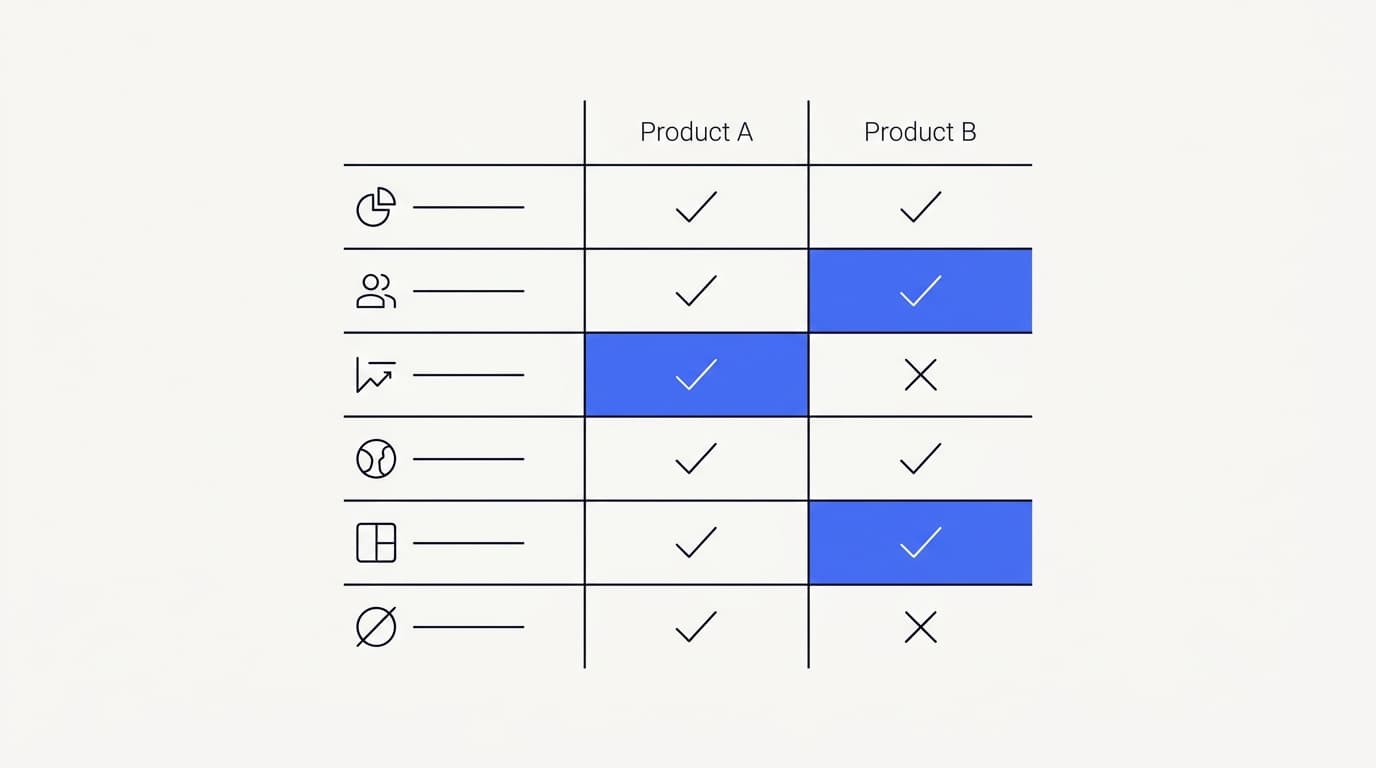
The comparison below uses archetypes, not a fabricated spec sheet for any specific product. It describes how the two design centers typically behave, so you can place a real tool on the spectrum yourself rather than trust a marketing table. Verify each row against the actual product in a trial before you weight it.
| Criterion | Incumbent suite archetype | AI-agent-first archetype |
|---|---|---|
| Core design center | Broad platform, AI added on | Agent is the product |
| Resolves at volume without a human | ✓ (varies by setup) | ✓ (built for it) |
| Presence-based human handoff | ✓ (varies) | ✓ (core pattern) |
| Best team size | Larger support orgs | Small and lean teams |
| Breadth of adjacent modules | ✓ Extensive | ✗ Focused, by design |
| Setup and configuration load | ✗ Higher | ✓ Lower |
Read that table as a starting map, not a verdict. A real incumbent may be lighter to set up than the archetype suggests, and a real agent-first tool may have more breadth than you expect. The point is to know which design center you are evaluating, then check the specifics against your own needs.
Run the check on your own material, not the vendor's script. Pull 50 to 100 real questions from your ticket history, weighted toward your highest-volume topics, and score each answer on accuracy, brand voice, and whether it escalated when it should have. Communicate's one-time $1 activation includes 100 test credits for exactly this, so you can spend them on the ugly, half-worded questions real customers send rather than a rehearsed demo.
Pricing: credit-based usage versus seat-and-suite
 Communicate.so
The pricing model decides whether growth rewards you or bills you. Incumbent suites tend to price on a base plan plus seats plus add-ons, sometimes with usage-based resolution fees layered on top. That structure made sense when humans did all the work, and it gets awkward when the AI resolves most of it, because you keep paying for a shape of work that is shrinking.
Credit-based pricing takes a different approach. You buy usage in units up front and spend them as the agent works, so the cost tracks what the system actually does rather than how many humans are logged in. It is predictable if you understand your own volume, and it does not charge you for seats the AI made redundant.
Be specific about Communicate's model rather than vague. There is no free tier. Entry is a one-time $1 account activation that confirms you are a real person and includes 100 test credits, then credit-based usage from there.
The single model behind it is gpt-4o-mini served through OpenRouter with response and prompt caching, which is part of how the per-conversation cost stays low.
Watch for the parts of any pricing page that hide the real number. A base plan that looks cheap can carry the cost in per-seat and per-add-on lines, and a usage-based resolution fee can spike during a traffic surge or a bad-news week. The honest way to compare is to model a year at your expected volume under each tool's actual model, not to compare the smallest advertised plans.
| Pricing dimension | Seat-and-suite model | Credit-based model |
|---|---|---|
| Charges for human seats | ✓ Usually | ✗ No |
| Cost tracks AI work done | ✗ Loosely | ✓ Directly |
| Predictable a year out | ✗ Add-ons vary | ✓ If volume is known |
| Free tier that can throttle | ✓ Common | ✗ None, $1 entry instead |
| Punishes growth | ✓ Seats and tiers add up | ✗ Buy what you use |
Neither model is dishonest by nature, and a suite can be the cheaper option for a team that uses the whole platform. The mistake is comparing headline prices instead of models. For the full cost math on the AI-agent-first side, including how caching changes the per-conversation figure, see what AI customer support actually costs.
What migrating off Intercom actually involves
 Communicate.so
Migration is a project, not a switch, and pretending otherwise is how rollouts stall. The good news is that an AI-agent-first tool needs less to move than a full suite, because you are not recreating dozens of modules. You are moving the knowledge the agent answers from, the channels customers reach you on, and your escalation rules.
Start with the knowledge base. The agent answers from the content you connect, so the first job is getting your help center, product docs, and any policy pages into the new tool and structured for retrieval. Structuring content by single topic rather than by whole document is the highest-impact step, because most wrong answers are retrieval problems, not model problems.
Then sequence the channels rather than switching everything at once. Put the embeddable widget on a low-traffic page first, watch the first conversations land in your shared inbox, and expand from there. Adding in-app messages and email once the widget is proven keeps any early mistakes contained to a surface you control.
Design the escalation and any actions carefully before you widen traffic. Actions let the agent do something during a conversation, like look up an order, and they are the highest-risk capability because a mis-triggered action costs more than a wrong sentence. Scope and test them channel by channel rather than turning them all on at launch.
The reason to sequence is not caution for its own sake. RAND Corporation's 2025 review of more than 2,400 enterprise AI initiatives found that roughly 80% failed to deliver measurable value, and most failures traced to rollout discipline rather than model quality (RAND). A staged migration is how you stay on the right side of that number.
The full production playbook is in how to implement an AI support agent in production.
Security and data handling when you switch vendors
Moving support tools means moving customer data, so the security posture is part of the migration decision, not a footnote. Read the new vendor's security page before you commit, and ask specific questions that expect specific answers. Treat vague answers as answers.
Ask whether data is encrypted at rest, and whether every plan includes two-factor authentication without an enterprise upcharge. Ask how one workspace's data is isolated from another's, and whether you can export and fully delete your data on demand without filing a ticket. Ask plainly whether the vendor trains shared models on your conversations, because the honest answer should be no.
State your own posture honestly is the standard to hold a vendor to, so here is Communicate's without inflation. Data is encrypted at rest, TOTP two-factor authentication is available on every plan, and workspaces are isolated from each other. Export is self-serve and deletion cascades, which supports a GDPR-ready posture, though Communicate is not formally certified.
Payments run through Dodo as merchant of record, so card data and PCI scope sit with the processor.
Name the gaps directly, because a vendor that hides them is the bigger risk. Communicate does not hold SOC 2, HIPAA, or ISO 27001, runs in a single region on Railway hosting, and does not offer SSO today. If any of those is a hard requirement for you, especially HIPAA for protected health information, get the answer in writing before you invest in evaluation.
You can reach the team at [email protected], and the full posture lives on the security page.
Apply the same scrutiny to whatever incumbent you are leaving and whatever alternative you are considering. The goal is not to find a tool with zero gaps, because none exists. It is to find one whose gaps you understand and can live with, documented plainly rather than implied.
Key takeaways
- Look for an Intercom alternative when your support has shifted to AI-first, when cost outgrows value, or when a broad suite is more surface than your team can run.
- Compare design centers, not feature counts: an incumbent suite adds AI to a broad platform, while an agent-first tool builds everything around the agent.
- Be fair about incumbent strengths. Breadth, ecosystem, and large-team scale are real, and switching away from them has a cost.
- Score on resolution, handoff quality, grounded retrieval, operating-model fit, and pricing predictability, tested on your own ticket history rather than a demo.
- Read the pricing model, not the headline. Credit-based usage tracks AI work; seat-and-suite can charge for humans the AI made redundant.
- Migrate in stages: move the knowledge base first, sequence channels, scope actions carefully, and verify the new security posture before you widen traffic.
Ready to test an alternative on your own material? Start with a one-dollar account activation that includes 100 test credits, feed the agent your real support questions, and score the answers before you move anything. If you are earlier in the decision, the AI customer support software buyer guide and the AI Agents overview are the right next reads.
Frequently asked questions
What is the best Intercom alternative?
There is no single best alternative, because the right choice depends on your team size and how much of a suite you actually use. For teams that want AI to resolve the bulk of volume, an AI-agent-first platform tends to fit better than a broad suite. Communicate is one such option, built around the AI agent with credit-based pricing, and the honest test is to score it on your own ticket history.
Why do teams look for an Intercom alternative?
Teams usually cite three reasons: cost that climbs faster than the value they get, a suite with more surface than a small team can run, or a desire for an AI-agent-first tool rather than AI added onto a ticketing product. None of these mean Intercom is a bad product. They mean the shape of the team's support changed and the tool stopped matching it.
Is Intercom a good product?
Yes. Intercom is a mature suite with real strengths in breadth, ecosystem, and large-team scale, and many teams run it happily. You can read broad user sentiment on a review platform like G2 before deciding.
The question is not whether it is good, but whether a different design center now fits your operation better.
What does AI-agent-first mean?
AI-agent-first means the product is built around the agent as the core, with the shared inbox, analytics, and handoff designed around resolution rather than added on top of a ticketing tool. An incumbent suite starts from a broad platform and layers AI onto it. The difference changes the defaults for retrieval, handoff, and how the tool expects a team to work.
How is an AI-agent platform different from an incumbent suite?
An incumbent suite optimizes for breadth and a large-team workflow, bundling messaging, ticketing, a help center, tours, and outbound. An AI-agent platform optimizes for resolution, a tight handoff, and a small-team operating model. Most real tools sit somewhere on that spectrum, and knowing where a tool sits tells you most of what you need before a demo.
Is Communicate cheaper than Intercom?
It depends on your volume and how much of a suite you use, so compare models rather than headline prices. Communicate uses a one-time $1 activation with 100 test credits, then credit-based usage with no free tier and no per-seat charge. For teams where the AI resolves most conversations, a credit-based model often tracks cost to value better than seats and add-ons, but you should model a year at your own volume to be sure.
What is the difference between deflection rate and resolution rate?
Deflection rate is the share of conversations closed without a human, which counts abandoned or wrongly answered conversations as wins. Resolution rate measures conversations the customer actually confirmed as solved. Resolution is the number that maps to real support quality and the one worth comparing tools on.
Does Communicate have a free tier?
No. Communicate has no free tier. Entry is a one-time $1 account activation that confirms you are a real person and includes 100 test credits, then credit-based usage from there.
The stance is deliberate: a free plan that throttles the moment you get real traffic is a funnel, not a pricing model.
How does Communicate handle the human handoff?
Communicate uses presence-based takeover in its Shared Inbox. A conversation locks to human mode the moment a support agent opens it, so the AI never replies over a person mid-reply, and a chatTurn backstop prevents double answers. The full transcript stays visible to whoever owns the thread, so the customer never starts over.
Will I lose my data when migrating off Intercom?
A migration moves your knowledge base, your channels, and your escalation rules, not a full recreation of every module. Your existing content and history stay in your control during the move, and you export from your current tool and import into the new one. Sequencing the migration one channel at a time keeps any early mistakes contained rather than affecting all customers at once.
How long does it take to migrate to an AI-agent platform?
A staged migration can be live on a first channel in days, then expand over a few weeks as you add surfaces and tune the knowledge base. Starting with the embeddable widget on a low-traffic page is the lower-risk path. The full production sequence is in how to implement an AI support agent in production.
What is grounded retrieval and why does it matter?
Grounded retrieval means the agent answers from the data sources you connect rather than the model's general training. It matters because it stops the agent inventing a policy or price you never set, and it lets the agent say it does not know when the answer is genuinely missing. Test it by asking a question your docs do not cover and watching whether the tool guesses or hands off.
Is an AI-agent-first tool right for a large support team?
It can be, but breadth and role management are where an incumbent suite is genuinely strong for larger orgs. If you run dozens of agents with complex routing and reporting needs, weigh those strengths honestly. An agent-first tool fits best when you want the agent to carry volume and prefer a focused product over a broad one you half-use.
Does Communicate support multiple channels?
Yes. Communicate serves a website widget, in-app messages, and email from one agent and one knowledge base. It offers an embeddable widget, in-app messages, and a shared inbox, so answers stay consistent across surfaces rather than requiring a separate bot per channel.
What model does Communicate use?
Communicate runs a single model, gpt-4o-mini, served through OpenRouter with response and prompt caching. The single-model approach keeps behavior consistent and the per-conversation cost low. Caching means repeated context does not get re-billed on every turn, which is part of how credit-based pricing stays affordable.
Is Communicate secure enough to switch to?
Communicate encrypts data at rest, offers TOTP two-factor authentication on every plan, isolates workspaces, and supports self-serve export with cascading deletion for a GDPR-ready posture. It is not formally certified, does not hold SOC 2, HIPAA, or ISO 27001, runs in a single region, and does not offer SSO today. Whether that is enough depends on your requirements, which you should check against the security page before committing.
Does Communicate train on my conversations?
No. Communicate does not train shared models on your conversations. The agent answers from the data sources you connect, and your workspace data stays isolated from other customers.
If data handling is a hard requirement for you, confirm the specifics on the security page before you evaluate.
What happens when the AI cannot answer a question?
It hands off to a human rather than guessing. When grounded retrieval finds nothing relevant, the correct behavior is to say so and escalate, and Communicate's presence-based takeover routes the conversation to a person with the full history intact. We cover the mechanics in AI to human handoff in support.
Do customers really want faster AI answers over waiting for a human?
Most frustration comes from friction, not from the answer's source. Zendesk's 2024 CX Trends report found that 74% of customers rank having to repeat themselves among their top frustrations (Zendesk). An AI agent that resolves instantly and hands off with full context, rather than making the customer re-explain, addresses exactly that frustration.
How do I know if switching is worth it?
Run the alternative on your own material before you decide. Pull 50 to 100 real questions, score them on accuracy, brand voice, and correct escalation, and compare the result against what your current tool delivers at what price. Communicate's $1 activation with 100 test credits exists so you can run that test cheaply, and the broader decision framework is in the AI customer support software buyer guide.