
How to implement an AI support agent in production, not just a demo
 Communicate.so
The parts of a rollout that never make it into the afternoon demo: escalation design, multi-channel sequencing, knowledge base structure, pre-launch testing, and what to monitor after go-live.
TL;DR: A production-ready AI support agent implementation needs four things a demo never tests: a clean escalation path to a human, a sequenced multi-channel rollout, a knowledge base chunked for retrieval instead of reading, and a monitoring habit that catches drift before customers do. RAND Corporation's 2025 review of more than 2,400 enterprise AI projects found roughly 80% failed to deliver measurable value, and most of those failures traced back to rollout discipline, not model quality.
Getting an AI support agent to answer questions correctly in a demo takes an afternoon. Getting it to run in production, across every channel your customers use, without embarrassing you in front of a paying customer, takes far more discipline than most teams budget for. If you have already read our guide to launching your first AI agent in an afternoon, you have a working bot.
This guide covers what comes after: the parts nobody puts in the demo, because they only show up once real traffic hits the system.
A rollout problem, not a model problem, explains most AI support failures. RAND Corporation's 2025 review of more than 2,400 enterprise AI initiatives found that roughly 80% failed to deliver measurable business value. An estimated $547 billion of that year's $684 billion in AI investment produced no return teams could point to.
Most of those failures trace back to a small set of avoidable mistakes: teams switch on every channel at once, they automate rare edge cases before nailing the high-volume questions, and they ship a bot with no way for support staff to see or correct what it is saying.
This guide covers the parts of an AI support agent implementation that separate a toy demo from something you can trust with real customers. It walks through escalation design, channel sequencing, knowledge base structure, pre-launch testing, and the monitoring habits that catch failure modes before they become public incidents.
Why the afternoon build and the production system are different problems
The afternoon build proves the model can answer questions when fed good documents and asked good questions. Production proves the system can survive bad documents, ambiguous questions, angry customers, and the slow decay of your own content over time. Treating those as the same engineering problem is the single most common reason rollouts stall.
Here is the shape of the gap. A demo runs against a curated slice of your docs, tested by people who already know the right answer. Production runs against everything you have ever published, including the outdated pricing page from two launches ago, tested by customers who phrase the same question five different ways.
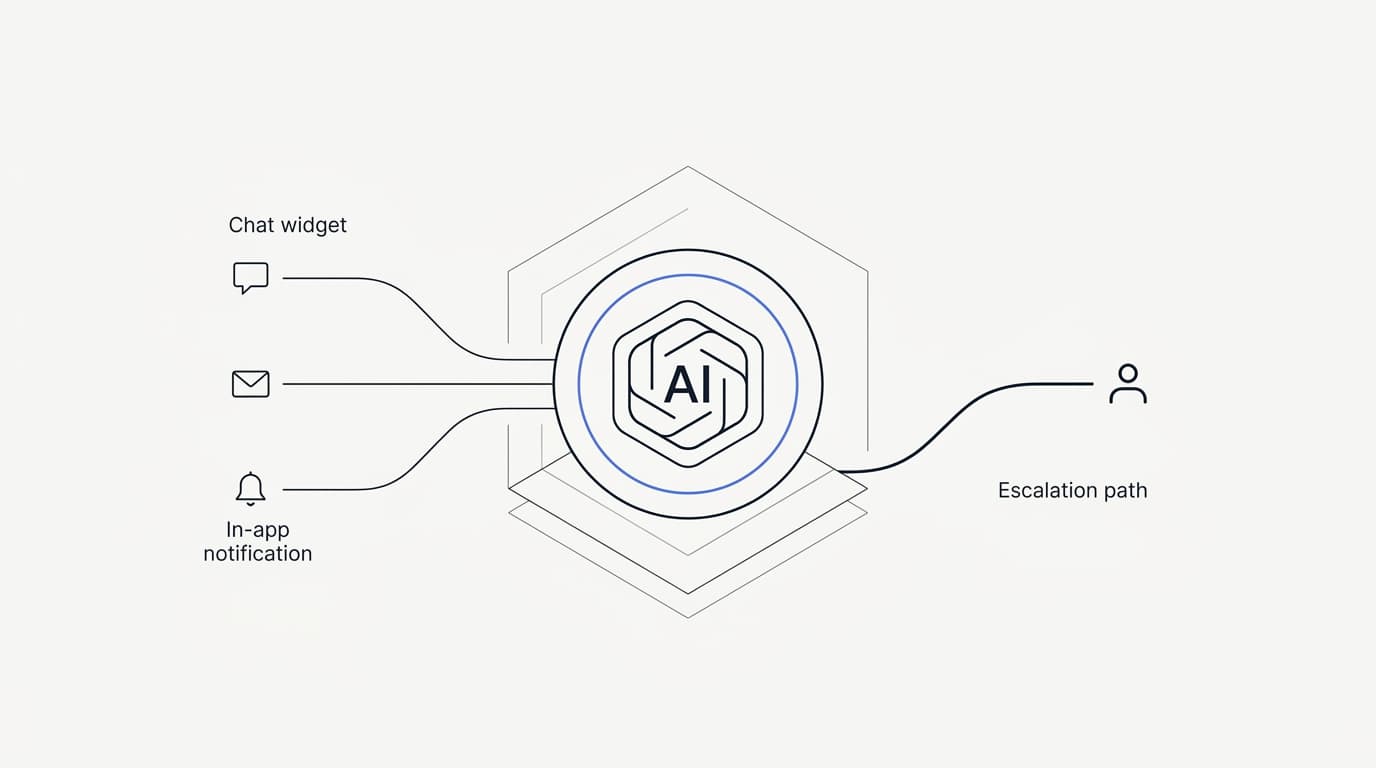
The demo has one channel. Production usually needs three: a chat widget on your site, a shared inbox where email and live chat land, and increasingly an in-app messaging layer for proactive nudges. The demo has no escalation path, because nobody needs one when you are the only person testing it.
Production needs a fast, well-defined path to a human, because the moment your AI agent is wrong in front of a real customer with money on the line, the cost of that mistake stops being hypothetical.
None of this means the afternoon build was wasted effort. It proves your knowledge base is worth training on, and it gives your team a feel for how the agent talks. But before you put it in front of unscreened traffic, you need answers to five questions: where does the agent hand off, how do you roll out to more than one channel without a support meltdown, is your knowledge base structured for retrieval instead of just existing, how do you test the thing before customers do, and how will you know when it starts drifting once it is live.
The rest of this guide takes them in that order.
Escalation path design: when the agent hands off and how
 Communicate.so
A support team that guesses when to escalate builds either an agent that never hands off or a team that drowns in low-value tickets. Escalation design is the part of an implementation most teams treat as an afterthought, usually a single Slack message that says "add a handoff button," and it is the part most likely to break in production.
Get it wrong and you get one of two outcomes. Either the agent never escalates and keeps guessing at questions it should have passed along, or the support team drowns because every mildly complicated question gets kicked to a human regardless of whether the AI could have handled it.
Industry writeups on failed CX rollouts keep landing on the same root cause, sometimes described as agent amnesia: a human picks up a conversation with no memory of what the AI already said, has to ask the customer to repeat themselves, and the customer's trust in the whole system collapses in that one moment. If your escalation path loses context, it does not matter how good your model is. The handoff is the product, from the customer's point of view.
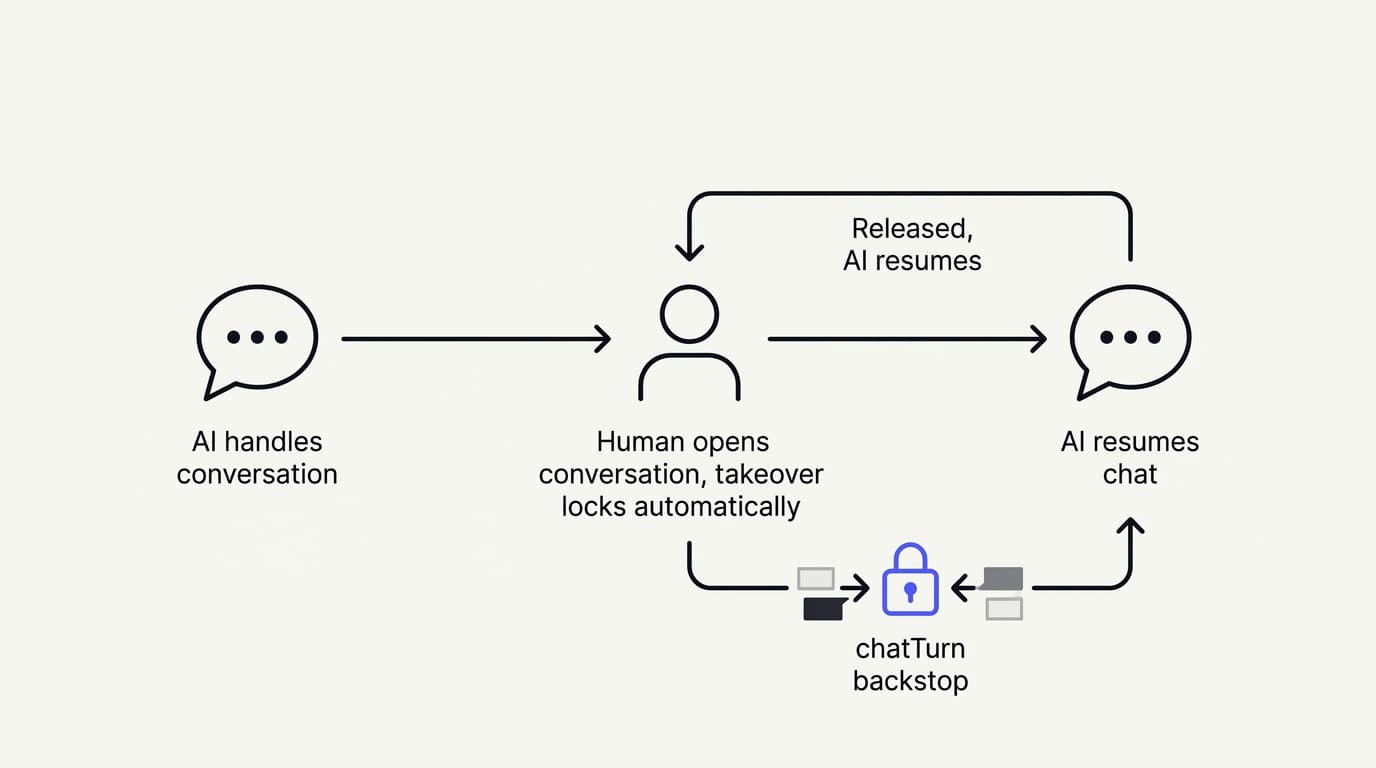
The flow is simple to describe: a customer message arrives, and if retrieval finds relevant content the AI answers, otherwise it states the limit and offers a human. When a human opens the conversation, takeover locks automatically and a chatTurn lock holds while the human replies, releasing back to the AI only once the human is done.
Presence-based handoff beats manual toggles
The fix that works in practice is presence-based takeover instead of a manual switch. Communicate's Shared Inbox is built this way. When a human agent opens a live conversation to look at it, the thread locks to human mode automatically.
No toggle, no button, no race condition where the AI replies half a second after a human started typing.
Release the conversation and the agent picks it back up. The full transcript stays visible to both sides the entire time, so nobody starts from zero. We wrote about the mechanics of this in how Shared Inbox keeps AI and humans in sync, and a broader comparison of handoff patterns is in our piece on AI-to-human handoff design.
Manual toggles depend on a human remembering to flip a switch under time pressure, which is exactly when people forget to flip switches. A support agent scanning ten open conversations does not have the spare attention to individually claim each one before responding. Automatic takeover on view removes that step entirely.
It also removes the most common bug in handoff systems: the AI keeps replying for a few seconds or minutes after a human has already jumped in, because nothing told it to stop.
| Handoff mechanism | Manual escalation button | Presence-based takeover |
|---|---|---|
| Preserves full conversation context | ✗ (often re-explained) | ✓ |
| Requires the agent to remember a step | ✓ | ✗ |
| Risk of AI replying over a human | ✓ | ✗ |
| Works under high ticket volume | ✗ | ✓ |
| Requires new UI training for staff | ✓ | ✗ |
Design the backstop before you need it
A second failure mode is subtler and will happen even with presence-based takeover. A human agent is mid-reply, typing a careful answer to a frustrated customer, and the AI fires off its own response before the human hits send. Now the customer has two conflicting answers in the same thread, and the human's careful reply looks like it is contradicting the bot.
This is the exact scenario a chatTurn backstop prevents: a lock on the AI's turn that holds as long as a human reply is in progress, so the AI never talks over a human mid-response. It is a small mechanism. It is also the difference between a system customers trust and one where support reps quietly disable the AI because they do not trust it to stay out of the way.
Build your escalation rules around volume, not vibes. Track what percentage of conversations need a human, and treat any number above 30 to 40% as a signal your knowledge base has gaps, not a signal that AI support does not work for your product.
An escalation rate near zero is not a win either. It usually means the AI is answering things it should not be confident about. A healthy production system escalates deliberately: billing disputes, anything involving a refund or a contract term, and any question the retrieval step comes back empty on.
Everything else is fair game for the agent to handle end to end.
Multi-channel rollout: one agent, three surfaces
 Communicate.so
Launching every channel at once is the single most common rollout mistake in the failure-mode research. It looks efficient on a roadmap. In practice it means debugging three integration surfaces at once, with three different failure signatures, while also trying to figure out whether a bad answer came from a knowledge gap or a channel-specific formatting bug.
Roll out sequentially instead.
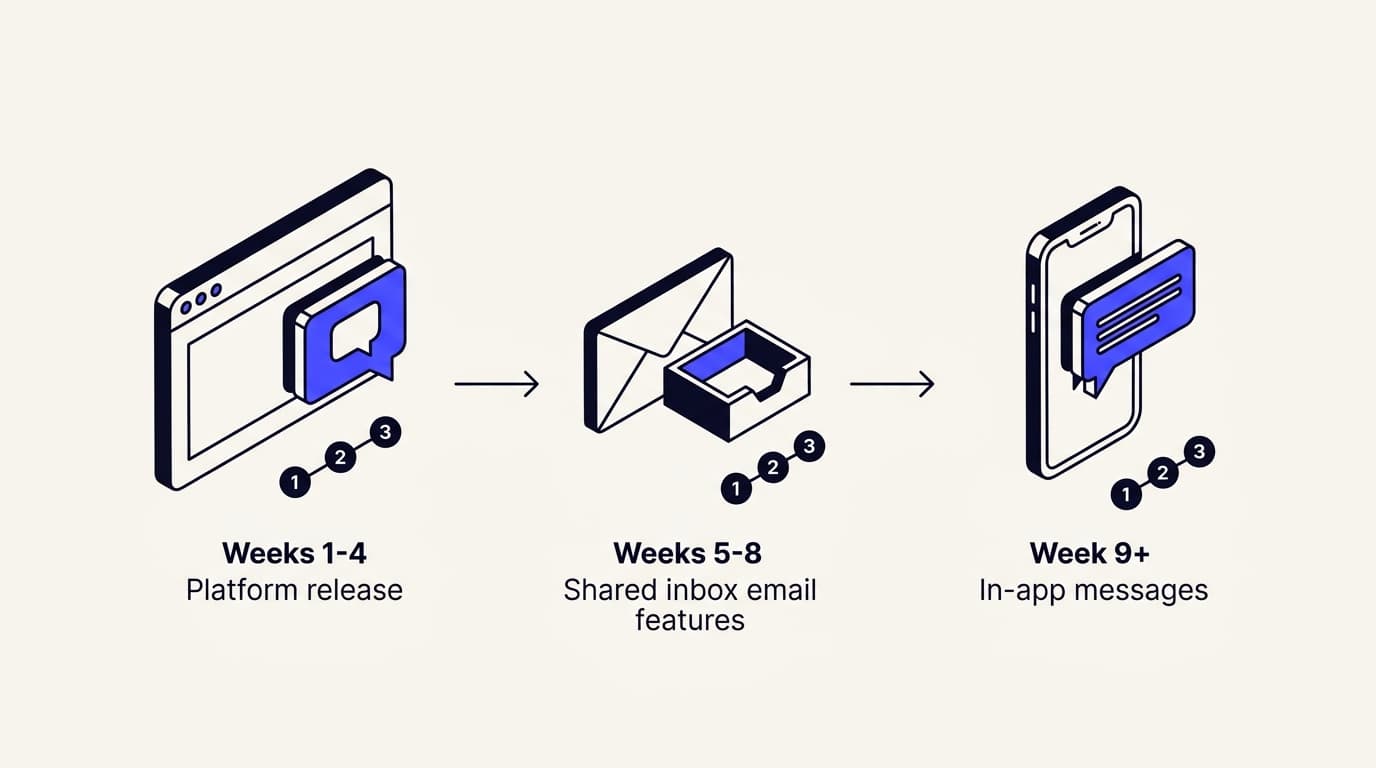
Start with the embed widget on your site. It is the lowest-risk surface: visitors are already in a browsing, low-stakes mindset, the conversation is fully logged, and you can iterate on prompt and knowledge base quality without touching anyone's inbox. Run the widget alone for two to four weeks.
Watch escalation rate and watch which questions get asked repeatedly that your knowledge base does not answer well. Fix those gaps before adding another channel.
Once the widget is stable, bring in email through the Shared Inbox. Email behaves differently: replies are asynchronous, threads run longer, and customers write with more context and more frustration than a typical chat widget visitor. The AI needs to handle multi-paragraph messages, quoted history, and forwarded threads, all messier than a chat bubble.
This is also where the escalation design from the previous section gets tested for the first time, since email is where your support team spends most of its day. Only after both surfaces are solid should you add in-app messages for proactive nudges, or extend into other messaging channels.
Proactive outreach carries different risk. You are not responding to a question, you are initiating contact, and a badly timed proactive message does more brand damage than a bad reactive answer, because the customer did not ask for the interaction in the first place.
Two things make multi-channel rollout easier than teams expect once you have sequenced it correctly. If your knowledge base and escalation rules are solid from the widget phase, most of that work carries over. You adjust tone and response length for the medium instead of rebuilding training data per channel.
Actions that let the agent do something, like look up an order or trigger a refund workflow, should be added channel by channel too, not all at once. A mis-triggered action in production is a far more expensive mistake than a wrong sentence, so test actions in the lowest-stakes channel first.
Keep security in view through all of this. Whatever data sources you connect for retrieval, whatever actions you let the agent execute, and whatever channel you deploy to, the access boundaries need to match the ones your human support team already respects. Read Communicate's security page before wiring up a new data source or action, not after.
Structuring your knowledge base for training quality
Most AI support agent quality problems are not model problems. They are retrieval problems dressed up as model problems. If the agent hallucinates or gives a confidently wrong answer, check first whether the right answer was retrievable from your knowledge base in a usable form, before assuming you need a better model.
Chunk by topic, not by document
 Communicate.so
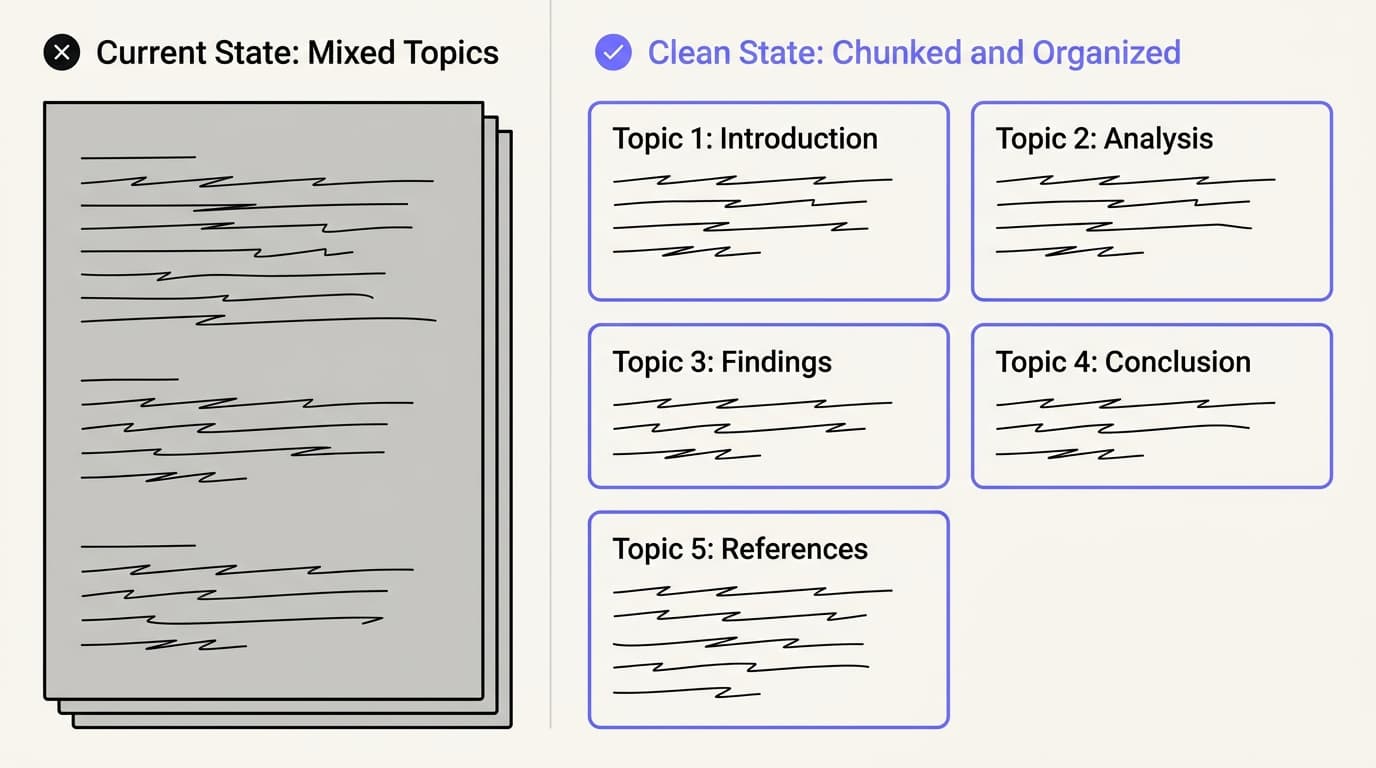
The instinct most teams have is to dump their existing docs, PDFs, and help center articles into the data sources connector and call it done. That works for a demo. It breaks down in production, because most support documentation is written for a human skimming a page, not for a retrieval system pulling isolated chunks.
A single help center article covering "billing, refunds, and plan changes" under one heading gives the retrieval step a chunk that is half-relevant to any specific question about it. That is exactly the condition that produces a confident, half-wrong answer.
The fix is single-topic chunking: each retrievable unit answers one question completely, with enough surrounding context to make sense pulled out on its own. If your refund policy has three different rules depending on plan tier, that is three chunks, not one paragraph with three caveats buried inside it. This work is tedious to set up.
It is also the highest-leverage work you can do before launch, more valuable than almost any prompt tweak.
| Chunking approach | Retrieval accuracy on specific questions | Setup effort |
|---|---|---|
| Whole-document dump | ✗ Low, mixes unrelated topics | ✓ Minimal |
| Single-topic chunks | ✓ High, each chunk stands alone | ✗ Higher, needs editorial pass |
| Section-level chunks (no rewrite) | ✗ Medium, still mixes sub-topics | ✓ Low |
Let real questions write your outline
The second mistake is building a knowledge base around what you assume customers ask instead of what they type into the box. Teams that structure content around real support tickets and live chat transcripts consistently see better first-contact resolution than teams that write from an assumed FAQ list drafted by whoever was available in marketing.
Before finalizing your knowledge base structure, pull the last three to six months of support tickets and sort them by frequency. That list is your real outline. Compare it against what is currently documented.
Your best-covered topics are usually not your most-asked ones.
Treat the knowledge base as a living system, not a one-time upload. Set a monthly cadence to review which questions the agent is failing on, retire outdated content instead of leaving it to contradict newer articles, and route obvious gaps back to whoever owns your help center.
A knowledge base that is current for the plan and pricing structure you shipped last quarter, but still describes the structure from two quarters ago, is not a minor inconsistency. It is the single most common cause of an agent confidently telling a customer something that is no longer true.
Testing methodology before go-live
The gap between "the demo worked" and "this is safe to point at real traffic" gets closed by testing, and most teams skip past it, because testing an AI agent does not look like testing normal software. There is no fixed set of inputs and expected outputs. Build one anyway.
Start by pulling 50 to 100 real questions from your support ticket history, weighted toward your highest-frequency topics, and run every one through the agent manually before launch. Score each answer on three axes: was it factually correct, did it match your brand voice, and did it escalate when it should have.
This is exactly what Communicate's one-time account activation is built to support. It includes 100 test credits specifically so teams can run real questions against their own documentation before a single customer sees the widget. Use them for this, not for the same three questions from the demo.
Burn them on the ugly, ambiguous, half-worded questions real customers send.
Beyond correctness testing, red-team the agent before launch. Deliberately try to break it the way an adversarial or simply confused customer would. Ask it about competitors.
Ask it to make a promise your company cannot keep, like a discount that does not exist. Ask the same question three different ways to see if it gives three different answers.
Ask something completely outside your product's scope and see whether it invents a plausible-sounding answer instead of saying it does not know. That last test matters more than any other single check, because it is the failure mode most likely to produce a screenshot that ends up on social media.
Set a go/no-go bar before you start testing, not after you see the results. It is easier to be honest about a threshold you committed to in advance than one you set retroactively to justify a launch date. A reasonable bar for most support use cases is 90%+ factual accuracy on your test set and zero instances of the agent inventing information on out-of-scope questions.
If you are not hitting that, the fix is almost always knowledge base structure, not prompt engineering. Go back to the chunking and content-freshness work before touching the system prompt again.
Handling ambiguous and out-of-scope questions
Every production support agent eventually gets a question it has no business answering: something about a feature that does not exist, a competitor's product, a legal question, or a garbled sentence that could mean three different things. How the agent handles that moment matters more than how it handles the easy questions, because it is the moment customers remember.
The correct default is for the agent to say what it does not know rather than filling the gap with a plausible-sounding guess. This sounds obvious and is hard to enforce, because language models are built to produce fluent continuations, and a fluent continuation to a question with no good answer often reads exactly like a confident wrong one.
The practical guardrail is to have the model check whether retrieval returned relevant, sourced content before it answers at all. If it did not, the model should respond with a clear "I don't have information on that" and route to a human or a form, rather than reasoning its way to something that sounds right.
Ambiguity is a related but different problem. A question like "can I get a refund" might mean the customer wants the refund policy explained, wants to process a refund on a specific order, or is asking whether refunds exist as a feature at all. Rather than guessing which one, a well-built agent asks a single clarifying question before committing to an answer path, the same thing a competent human support rep would do.
Test this explicitly in your pre-launch set. Include a handful of genuinely ambiguous questions and check whether the agent clarifies or picks a lane and guesses.
Write your out-of-scope handling into the system prompt as an explicit rule, not an implicit hope that good training data will produce the right behavior on its own. Something like: if retrieval returns no relevant content, say so plainly and offer to connect the customer with a human, rather than attempting to answer from general knowledge. This single rule, enforced consistently, prevents most of the hallucination incidents that show up in postmortems.
There is a tone question hiding inside all of this too. "I don't know" said flatly reads as unhelpful, and customers notice the difference between an agent that shrugs and one that knows exactly what to do next. The better pattern pairs the admission with a concrete next step every time: "I don't have information on that specific case, but I can get you to someone who does.
Want me to connect you now?"
That single sentence does three jobs. It is honest about the limit, it keeps the customer moving instead of stuck, and it hands off cleanly into the escalation path described earlier in this guide. Bake that phrasing into your prompt directly rather than leaving the model to improvise it, because improvised uncertainty is where hallucination tends to creep back in.
Monitoring and iterating after launch
Launch is the start of the real work, not the end of it. Teams that get burned by AI support agents almost always share one habit: they scaled traffic to the bot before they had any instrumentation in place to notice when it started saying the wrong thing. Fix that before you fix anything else post-launch.
At minimum, track three numbers weekly: escalation rate (what percentage of conversations the AI hands to a human, broken down by reason where possible), resolution rate on conversations it does not escalate, and CSAT or an equivalent satisfaction signal on AI-only resolved conversations specifically, not blended with human-handled ones.
Blending the two numbers hides exactly the information you need. A strong human-support CSAT can mask a mediocre AI-support CSAT for months. Analytics built around your actual conversation volume, not a generic dashboard bolted on after the fact, is what makes this tracking possible without someone manually pulling transcripts every week.
Response time is worth watching too, both as a leading indicator of system performance under real load and as one of the clearest wins to report back to the rest of the company. We have written before about cutting first response time to seconds instead of hours, and our first response time benchmark post is a reasonable place to check your numbers against.
Build a weekly review habit, even if it is just thirty minutes. Pull the conversations the agent escalated, and separately pull a random sample of ones it resolved on its own. Read them.
This is the single highest-leverage post-launch activity, and the one teams skip first when they get busy. That is exactly backwards, because the failure modes below do not show up in aggregate metrics until they have already done damage. They show up first in individual transcripts that look slightly off.
Assign this review to a specific person, not to "the team" generally, because ownerless recurring tasks are the first thing to slip once launch-week attention fades. It does not need to be a senior person. It needs to be someone who reads transcripts closely enough to notice when an answer is technically correct but phrased in a way your brand never would.
Give that reviewer a standing fifteen-minute slot on the calendar and a lightweight place to log what they find. A shared doc is enough at this stage. The goal is not a formal reporting process.
It is making sure at least one human is paying close attention while the metrics catch up to reality.
Common failure modes and how to catch them
 Communicate.so
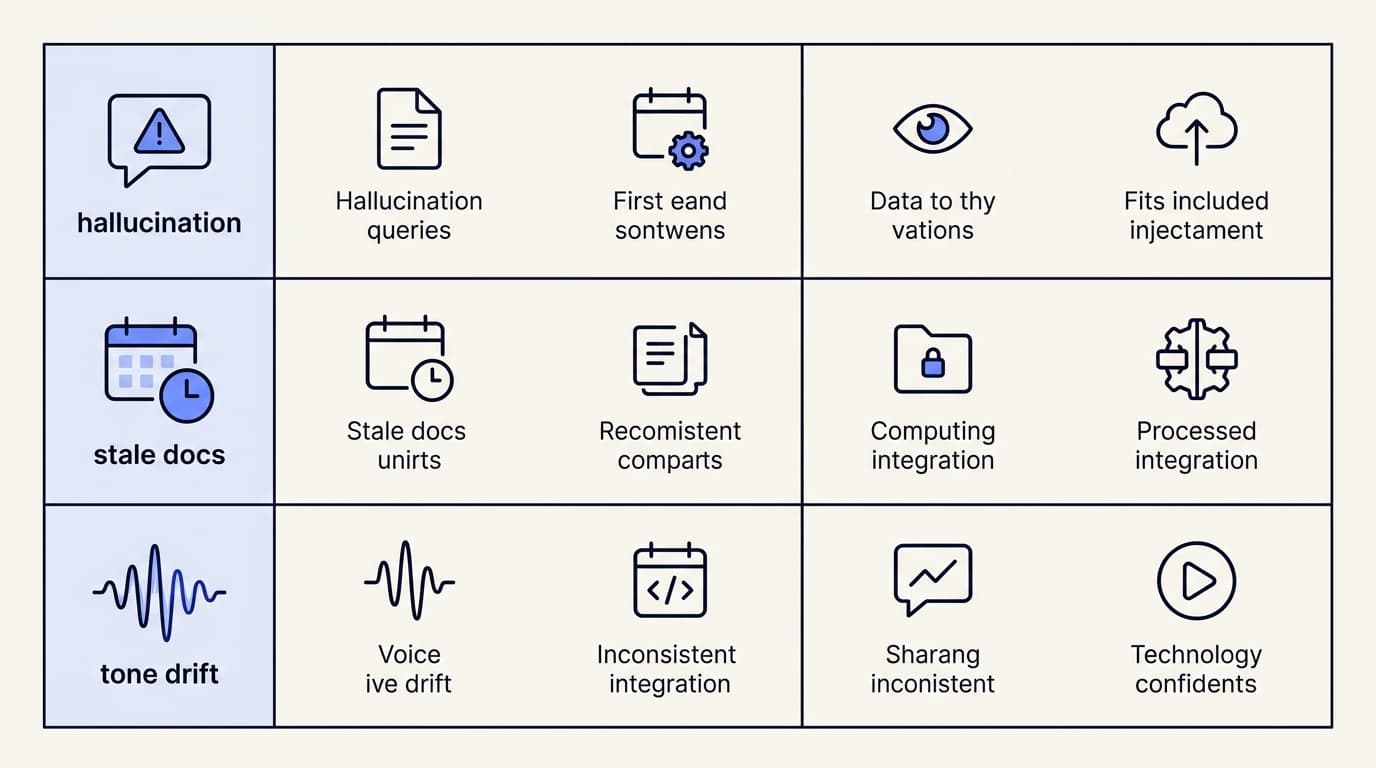
Three failure patterns account for most of the post-launch incidents teams run into. None of them require a better model to fix. All of them require someone reading transcripts on a schedule.
| Failure mode | Symptom | Detection method | Fix |
|---|---|---|---|
| Hallucination on out-of-scope questions | Confident, specific, wrong answer | Sample conversations with specific dollar amounts or dates, verify against docs | Tighten the system prompt rule for empty retrieval |
| Stale docs | Correct-sounding answer describes an old version of the truth | Cross-check answers against the current product state monthly | Assign KB ownership to whoever ships the product change |
| Tone drift | Right answer, wrong voice | Quarterly random sample read by whoever owns brand voice | Rewrite the source KB article, not the prompt |
Hallucination on out-of-scope questions
This is the failure mode covered above under ambiguous handling, but it deserves a second mention as a monitoring target, because it is the failure mode most likely to become a public incident. Watch for it by periodically sampling conversations where the agent gave a confident, specific answer, a dollar amount, a date, a policy detail, and manually verifying that answer against your documentation.
If you find even one instance of the agent inventing a specific detail that is not in your knowledge base, that is not a one-off. It is a signal the out-of-scope guardrail is not holding, worth revisiting immediately rather than waiting for the next review cycle.
Stale docs
Your knowledge base decays the moment you ship a product change and forget to update the article describing the old behavior. This stays invisible until a customer asks about the new feature and gets an answer describing the old one, confidently, because the retrieval step found a real document, just the wrong version of the truth.
The fix is process, not technology. Whoever owns a product change owns updating the corresponding knowledge base article as part of shipping it, the same way they would update a changelog. If that ownership does not exist yet, create it before your next major release.
Retrofitting it after a customer catches a stale answer is a much worse conversation to have.
Tone drift
This one is the hardest to catch with metrics, because it does not show up as a wrong answer. It shows up as a right answer delivered in a way that no longer sounds like your company. It happens gradually: knowledge base articles get added by different people with different writing styles, and the agent's responses slowly absorb whichever voice dominates the most recently added content.
The fix is a lightweight quarterly audit. Pull twenty AI-resolved conversations at random and have whoever owns your brand voice read through them, purely for tone, not accuracy. If something reads off, it is almost always traceable to a specific knowledge base source that needs a rewrite, not a system prompt problem.
What a healthy production system looks like after 90 days
By day 90, a well-run AI support agent implementation should look roughly like this. Escalation rate has stabilized in a predictable range rather than swinging week to week. Your knowledge base has been revised at least twice based on real gaps the agent surfaced, not guesses about what might be missing.
You have a standing weekly habit of reading a sample of transcripts instead of relying purely on dashboards.
You will also have a rough sense of the actual cost picture, both the savings from deflected tickets and the ongoing cost of running the system. If you are building the business case for expanding it, our breakdown of AI customer support costs covers that math directly.
None of this is exotic. It is closer to running a good support team than running a model. The knowledge base is the training manual, the escalation path is the shift handoff, the testing methodology is onboarding, and the monitoring habit is the manager who reads a sample of tickets instead of trusting the CSAT number blindly.
Gartner has projected that by 2029, agentic AI is expected to autonomously resolve 80% of common customer service issues without human intervention, a shift that only holds up if the underlying implementation is disciplined enough to earn that trust. Teams that treat their AI support agent implementation with that level of operational seriousness are the ones that end up in the 20% RAND found getting real value out of their AI investment, not the 80% that did not.
If you are earlier in the process and have not shipped anything yet, start with the afternoon build, get a working widget in front of internal traffic first, then come back to this guide before opening it to customers. If you are deciding whether AI support fits your product at all, the AI Agents overview and the rest of the guides section on this blog are a reasonable place to keep reading.
Key takeaways
- Escalation design, not model quality, decides whether customers trust the handoff. Presence-based takeover beats manual toggles because it removes the step humans forget under pressure.
- Roll out one channel at a time. Widget first, email second, proactive in-app messages last, because each surface has a different failure signature.
- Most AI answer-quality problems are retrieval problems. Chunk your knowledge base by topic, not by document, before touching the prompt.
- Test with 50 to 100 real questions and a pre-committed accuracy bar before launch, then keep testing with your real ticket backlog after.
- Build a weekly habit of reading transcripts. Hallucination, stale docs, and tone drift all show up there before they show up in your dashboards.
Ready to put this into practice? Start with a one-dollar account activation that includes 100 test credits, run your own support tickets through the agent, and see what a disciplined rollout looks like before you open it to customers.
Frequently asked questions
What is an AI support agent implementation?
An AI support agent implementation is the full process of taking a working AI support bot from an internal demo to a system handling real customer conversations in production. It covers escalation design, multi-channel rollout, knowledge base structure, pre-launch testing, and ongoing monitoring, not just the initial model setup.
How is an AI support agent implementation different from a chatbot deployment?
A basic chatbot deployment usually means connecting a model to a widget and a set of FAQs. A full implementation adds the operational layer around it: a defined escalation path to a human, sequenced channel rollout, a knowledge base structured for retrieval accuracy, and weekly monitoring of escalation rate and resolution quality.
What is presence-based human takeover in AI support agent implementation?
Presence-based human takeover is a handoff design where a conversation automatically locks to human mode the moment a support agent opens it to view, instead of requiring a manual toggle. Communicate's Shared Inbox uses this pattern to remove the race condition where an AI replies just after a human starts typing.
How do you design an escalation path for an AI support agent?
Start with rules based on category, not confidence guessing: escalate billing disputes, refund requests, contract questions, and any question where retrieval returns no relevant content. Pair that with a presence-based takeover mechanism and a backstop lock, like a chatTurn lock, so the AI never replies while a human is mid-response.
How do you roll out an AI support agent across multiple channels?
Launch one channel at a time. Start with the embed widget for two to four weeks, add email through a shared inbox once escalation and knowledge base gaps are fixed, then add proactive in-app messages last. Sequential rollout isolates failure signatures so a bad answer is easy to trace to its source.
How do you structure a knowledge base for AI support agent implementation?
Chunk content by topic instead of by document, so each retrievable unit answers one question completely. Build the outline from real support ticket frequency rather than an assumed FAQ list, and review the knowledge base monthly to retire outdated content before it starts contradicting newer articles.
How do you test an AI support agent before launch?
Pull 50 to 100 real questions from your support ticket history and run each one through the agent manually, scoring for factual accuracy, brand voice, and correct escalation behavior. Set a go/no-go accuracy bar, commonly 90%+, before you start testing, then red-team the agent with out-of-scope and adversarial questions.
Is presence-based takeover better than a manual escalation button?
Presence-based takeover generally outperforms manual buttons on high-volume support teams, because it does not depend on a human remembering to claim a conversation under time pressure. Manual toggles work fine at very low ticket volume, but they scale poorly and introduce race conditions as conversation load grows.
Is a single-model setup like gpt-4o-mini good enough for AI support agent implementation?
Model choice matters less than most teams assume once the retrieval and escalation layers are solid; a well-chunked knowledge base and a disciplined escalation path outperform a bigger model with a messy setup. Communicate runs a single gpt-4o-mini model with response and prompt caching, which keeps cost and latency predictable at production scale.
Should you launch on one channel or all channels at once?
Launch on one channel, sequentially, not all at once. Teams that launch every channel simultaneously end up debugging three integration surfaces at the same time, which makes it far harder to tell whether a bad answer came from a knowledge gap or a channel-specific bug.
How much does an AI support agent implementation cost?
Cost depends on conversation volume, the number of channels, and how much testing and knowledge base work goes in before launch, but the ongoing model cost itself is usually the smallest line item. The larger cost is the operational work: chunking documentation, running pre-launch test sets, and maintaining a weekly transcript review.
What does communicate.so charge to get started?
Communicate uses a one-time $1 account activation that includes 100 test credits, so teams can run their own support questions against the agent before it ever reaches a real customer. Full pricing details are on the pricing page.
Why should a support team invest in AI support agent implementation instead of hiring more agents?
A disciplined AI support agent implementation can resolve a meaningful share of repetitive, high-volume questions without adding headcount, freeing human agents for the disputes, edge cases, and relationship-building conversations that need a person, not a bot. The RAND research suggests the return depends entirely on implementation discipline, not on hiring less.
What are the benefits of chunking a knowledge base by topic?
Topic-based chunking means each retrievable unit answers one question completely, which sharply reduces the chance of the model pulling a half-relevant chunk and generating a confident, half-wrong answer. It is more work up front than dumping raw documents into a connector, but it is the highest-leverage fix for most AI answer-quality problems.
Why is my AI support agent hallucinating on out-of-scope questions?
The most common cause is a missing guardrail: the system prompt does not explicitly instruct the model to say "I don't know" when retrieval returns no relevant content, so the model defaults to producing a fluent-sounding guess instead. Add an explicit rule that checks retrieval results before the model answers at all.
Why does my AI support agent lose context when handing off to a human?
Context loss usually comes from a manual escalation flow that does not carry the full transcript to the human agent, forcing the customer to repeat themselves. Presence-based takeover, where the human opens the same conversation thread the AI was already in, avoids this because both sides see the identical history.
Why is my knowledge base returning wrong answers even though the content is correct?
The content is likely correct but poorly chunked, so retrieval pulls a fragment that is only partially relevant to the specific question asked. Rewrite the source article into single-topic chunks rather than editing the model's prompt, since the underlying retrieval problem will keep producing wrong answers regardless of prompt tweaks.
How long does an AI support agent implementation take from build to full rollout?
A realistic timeline runs eight to twelve weeks: two to four weeks on the widget alone, another four weeks bringing in email through a shared inbox, and the remainder stabilizing proactive in-app messaging. Teams that compress this timeline by launching every channel at once tend to spend more total time debugging afterward.
How long should you run a single channel before adding another?
Run the embed widget alone for two to four weeks before adding email, and confirm escalation rate and resolution quality have stabilized before adding a third surface like in-app messages. The right signal to move on is a flat, predictable escalation rate, not a fixed calendar date.
What is the best escalation rate for an AI support agent?
There is no single universal number, but an escalation rate consistently above 30 to 40% usually signals knowledge base gaps, and a rate near zero usually signals the agent is answering things it should not be confident about. Most healthy production systems land somewhere in between, with billing, refunds, and contract questions escalating by design.