
Support knowledge gap analysis: a weekly procedure that runs on Monday
 Communicate.so
A concrete weekly procedure for mining unanswered AI support questions into a product and docs roadmap, with exact steps a support lead can run.
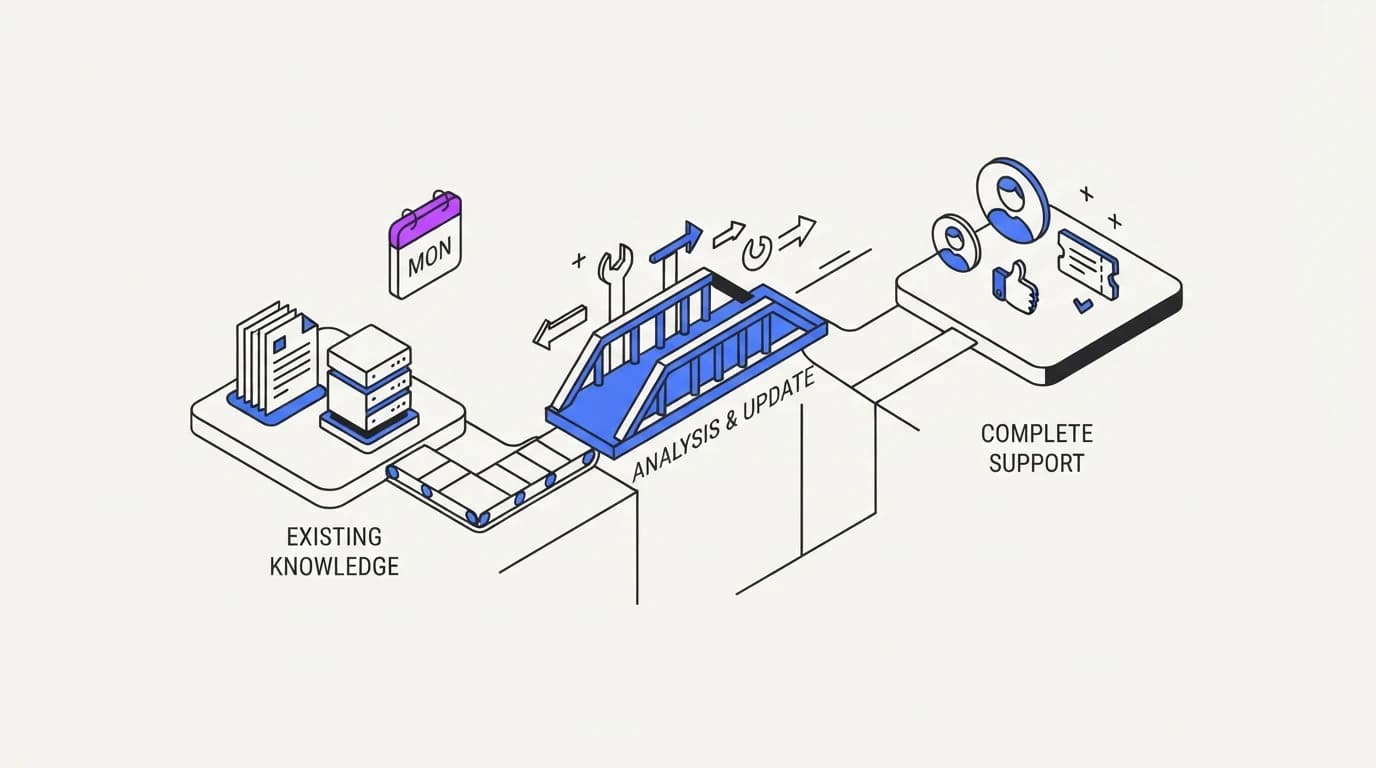
TL;DR: Every question an AI agent cannot answer confidently is a labelled gap in your documentation, product, or training data, and most teams let that list evaporate instead of mining it. This guide gives a concrete weekly procedure: pull unresolved and low-confidence conversations every Monday, sort them into product gaps, docs gaps, and training gaps, assign an owner to each, and close the loop by the following Monday. The stakes are real: CMSWire reports the share of organizations citing a negative GenAI consequence rose from 44% in 2024 to 51% in 2025, and Twig's review of AI support complaints names hallucinated answers as the top grievance. An unanswered question left unmined is not a neutral gap, it is where the AI agent is most likely to guess next time the same question arrives. Run this procedure for a quarter and the unanswered-questions list becomes the most honest product and content roadmap your team has.
An AI agent that answers from your content will eventually hit a question it cannot resolve. What happens to that question next is the difference between a support team that learns every week and one that answers the same gap forever, a distinction the ticket deflection rate benchmarks assume but rarely spell out.
This guide is a runnable procedure, not a philosophy. It names the exact query to run, the exact columns to fill in, and the exact cadence, so a support lead can start it this Monday and have a first report by the following one, drawing on the same discipline the help center training guide uses for content quality.
The premise is simple: an unanswered question is not noise, it is a labelled defect with a source and a timestamp. Most support tools already log it. The failure is almost never in the logging, it is in nobody reading the log on a schedule.
Why unanswered AI questions are a free roadmap
A support ticket that a human resolves and closes leaves behind a resolution, but an AI question the agent could not resolve leaves behind something more useful: a precise description of what your product or documentation is missing. Nobody has to interview a customer or run a survey to get it. The gap is already written down, in the customer's own words, timestamped and searchable.
Compare that to how most roadmaps get built: a sales team relays a handful of anecdotes, a support lead remembers a complaint from last month, and product prioritizes from memory and volume of loud voices. An unanswered-questions log replaces memory with a count.
The stakes for ignoring the log are not abstract. CMSWire's review of enterprise AI adoption found the share of organizations reporting at least one negative GenAI consequence rose from 44% in 2024 to 51% in 2025 (CMSWire). An unmined gap is exactly the condition that produces those consequences, because the AI agent faces the same unanswerable question again and, without a documented answer, is more likely to guess.
Twig's review of common AI support complaints puts hallucinated answers, no clear escalation path, robotic tone, missing context awareness, and poor integration at the top of what customers report (Twig). A weekly gap analysis directly targets the first and second of those: it finds where the agent lacks grounding before a customer hits the failure, and it flags where escalation should have triggered but did not.
What counts as an unanswered question before you start
 Communicate.so
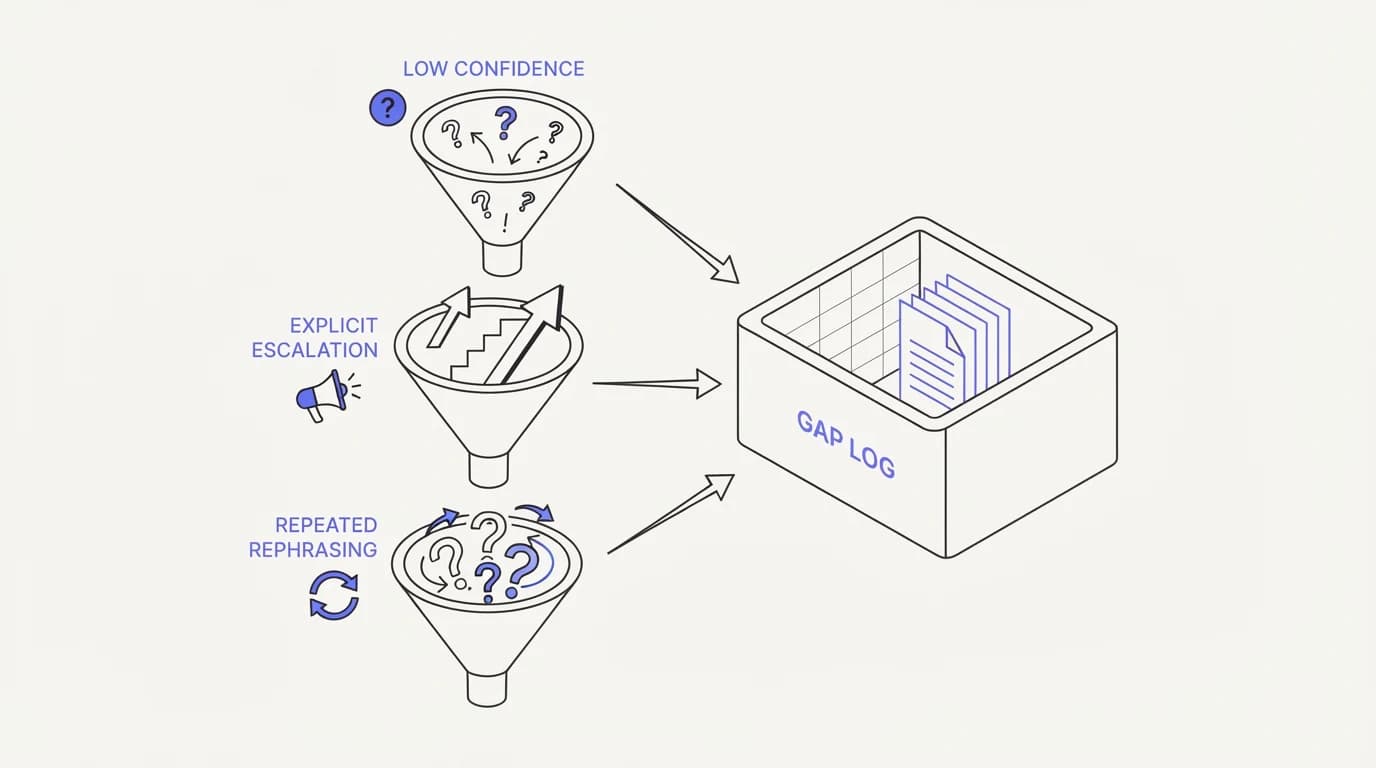
Define the categories before the first Monday, or the log will be inconsistent from week one. Three categories cover almost everything worth tracking, and each one is detectable from your existing conversation logs without new instrumentation.
Category one is a low-confidence answer: the AI agent responded, but its own grounding signal, retrieval match, or a reviewer's read of the transcript says the answer was thin or guessed rather than sourced. This is the category most tied to hallucination risk, since a weakly grounded answer is exactly the failure mode covered in the hallucination reduction guide.
Category two is an explicit escalation: the agent recognized it could not answer and handed off to a human, the intended behavior of a well-built AI to human handoff. These are the cleanest signal, because the agent is telling you exactly where its coverage ends.
Category three is repeated rephrasing: a customer asks a version of the same question two or three times in different words, which usually means the first answer did not land, even if the agent technically responded. This category catches gaps that would not show up as a hard escalation but still frustrated the customer.
Write these three definitions down and share them with whoever runs the weekly pull. Consistency in what counts as a gap matters more than getting the taxonomy perfectly right on day one.
The weekly procedure, step by step
 Communicate.so
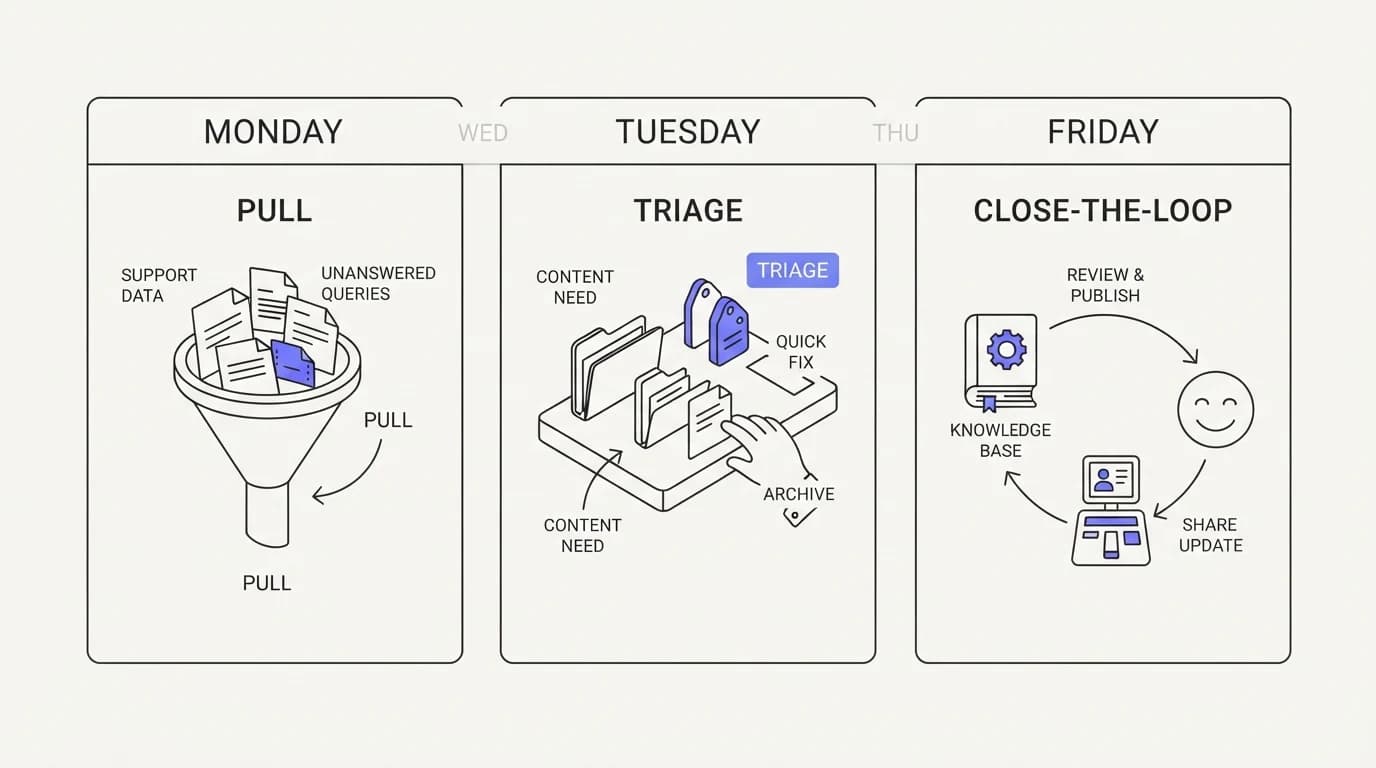
This is the runnable part. Follow it in order, every Monday, for a full quarter before you judge whether it is working.
Step one, Monday morning, 30 minutes: pull every conversation from the past seven days flagged as low-confidence, escalated, or repeated-rephrasing, using your analytics dashboard or a raw export from your AI agent's conversation log. Export to a spreadsheet with columns for date, customer question (verbatim), category, and current answer given.
Step two, Monday, 45 minutes: read every row and assign a root cause tag. Use exactly three tags to start: docs gap (the answer exists nowhere in your content), product gap (the answer would require a feature or policy that does not exist), and training gap (the answer exists in your content but the agent failed to retrieve or use it correctly).
Step three, Monday, 15 minutes: sort the sheet by root cause tag and count each. This count is the week's headline number, and it is worth tracking over time the same way you would track a first response time metric, since a rising docs-gap count usually means content maintenance has fallen behind product changes.
Step four, Tuesday: assign an owner to every row. Docs gaps go to whoever maintains the help center, product gaps go to a named product manager or a tagged item in the product backlog, and training gaps go back to whoever manages the AI agent's connected sources and retrieval configuration.
Step five, by Friday: each owner either closes the gap (a new help center article published, a retrieval fix shipped, a product ticket filed with a link back to the original transcript) or explicitly defers it with a reason. Update your connected data sources the moment a docs gap is closed, since a fix that never reaches the AI agent's grounding is not actually a fix.
Step six, the following Monday: before pulling the new week's data, check last week's sheet. Any gap still open after seven days gets flagged in the new report as aging, and anything aging past three weeks gets escalated to a manager review rather than staying quietly on a list nobody revisits.
Categorizing gaps: docs, product, or training
The three-tag system only works if the categories are genuinely distinct in practice, so it helps to see what each looks like in a real transcript. Misclassifying a gap sends it to the wrong owner and it stalls.
A docs gap looks like a customer asking a reasonable, answerable question, and a search of your entire knowledge base turns up nothing on the topic. The fix is a new article or an update to an existing one, and it is usually the fastest category to close, often within the same week.
A product gap looks like a customer asking for something the product genuinely cannot do yet, a refund policy that does not exist, an integration that is not built, a setting that is not exposed. No amount of documentation fixes this, and routing it to product rather than to your help center writer is the single most common misclassification a rushed Monday review makes, one of the reasons a RAG-grounded agent should refuse to answer rather than invent a policy.
A training gap looks like a customer asking a question your documentation genuinely answers, but the AI agent still failed to retrieve or apply that answer correctly. This is the category to investigate first when the docs-gap and product-gap counts are both low but the escalation count stays high, since it usually points at a retrieval or source-connection problem rather than a content problem.
| Signal | Docs gap | Product gap | Training gap |
|---|---|---|---|
| Answer exists nowhere in the knowledge base | ✓ | ✗ | ✗ |
| Requires a feature or policy that does not exist | ✗ | ✓ | ✗ |
| Answer exists but agent failed to retrieve it | ✗ | ✗ | ✓ |
| Owner: help center writer | ✓ | ✗ | ✗ |
| Owner: product manager | ✗ | ✓ | ✗ |
| Owner: AI agent and data source maintainer | ✗ | ✗ | ✓ |
| Typically closes within one week | ✓ | ✗ | ✓ |
Read the table as a routing chart. A gap that lands in the wrong column costs a week of delay while the wrong owner discovers they cannot act on it, which is the most common way a weekly procedure quietly degrades into a monthly one.
Turning gaps into content and product tickets
 Communicate.so
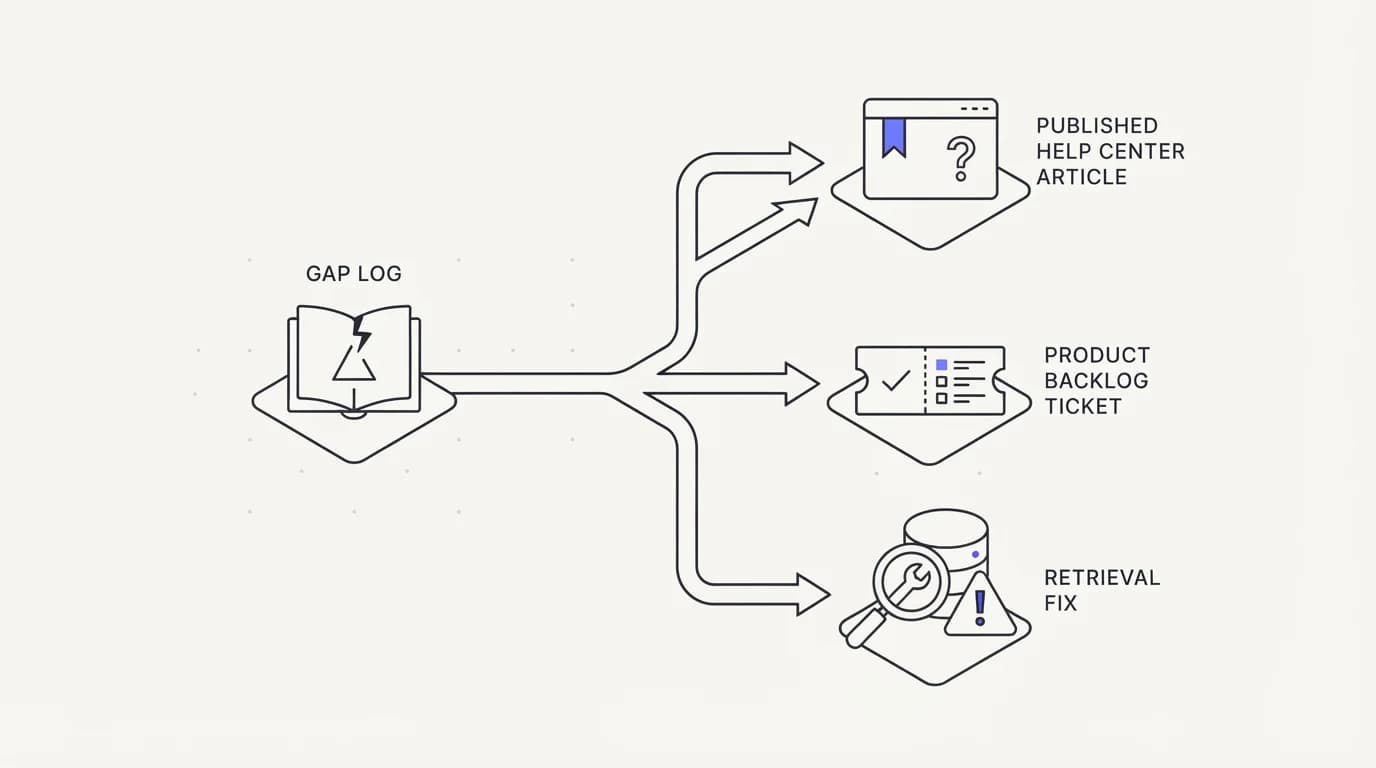
A gap log that never turns into a shipped fix is just a longer list. The close-the-loop step in the weekly procedure exists specifically to prevent that, and it needs a concrete definition of done for each category.
For a docs gap, done means a published or updated help center article, plus confirmation that the AI agent's connected sources have re-indexed the change. Publishing an article that the agent never ingests closes nothing, since the customer will hit the same gap on their next visit.
For a product gap, done means a ticket filed in your product backlog with the original customer question attached verbatim and a running count of how many times that same gap has recurred. A single instance might sit in a backlog for a quarter, but a gap that recurs ten times in a month is evidence a lone anecdote cannot match.
For a training gap, done means either a retrieval configuration fix, an added or corrected data source, or a documented decision that the question falls outside what the agent should answer and should instead route to escalation every time. All three are legitimate outcomes; the failure mode is leaving the gap open with no decision at all.
Keep a simple weekly scoreboard next to the gap log: opened, closed, and deferred counts by category. A team that opens fifteen gaps and closes four in the same week is falling behind even if four feels like progress, and the scoreboard makes that math visible instead of hiding it inside a growing spreadsheet.
Revisit deferred gaps monthly rather than letting a deferral become permanent by default. A gap deferred once because a launch was more urgent that week is a reasonable call; the same gap still sitting deferred three months later without anyone revisiting the decision is a process failure wearing the label of a decision.
Review the closed and deferred counts monthly, not just the weekly open count. A team that closes 90% of docs gaps within a week but defers every product gap indefinitely has a different problem than a team that closes nothing, and the monthly view is where that pattern becomes visible.
Common mistakes in a gap analysis program
Four mistakes account for most weekly procedures that quietly stop running after a month.
The first is starting without the three-category taxonomy defined in advance, so week one and week four sort gaps inconsistently and nobody can compare trends across time. Fix this before the first Monday, not after the first report looks confusing.
The second is skipping the ownership assignment step. A gap log with a root cause but no named owner sits in a spreadsheet, and a spreadsheet nobody owns dies within a month, the same failure mode that support escalation processes hit when a handoff has no receiving owner.
The third is treating the weekly count as a vanity metric rather than a trend line. A single week with twelve docs gaps means little on its own, but four consecutive weeks of rising docs gaps after a product launch is a clear signal that documentation did not keep pace with the release.
The fourth is closing a docs gap in the help center without confirming the AI agent actually re-indexed it. This is the most common silent failure in a gap analysis program, because the spreadsheet shows the gap as closed while the customer keeps hitting the same unanswered question.
A fifth mistake, less common but costly when it happens, is running the procedure only when volume spikes and skipping it during quiet weeks. Gaps accumulate at a steady background rate even when overall ticket volume is low, and a quiet week is often the best time to catch up on aging items rather than an excuse to skip the review entirely.
Ad hoc review versus a weekly procedure
 Communicate.so
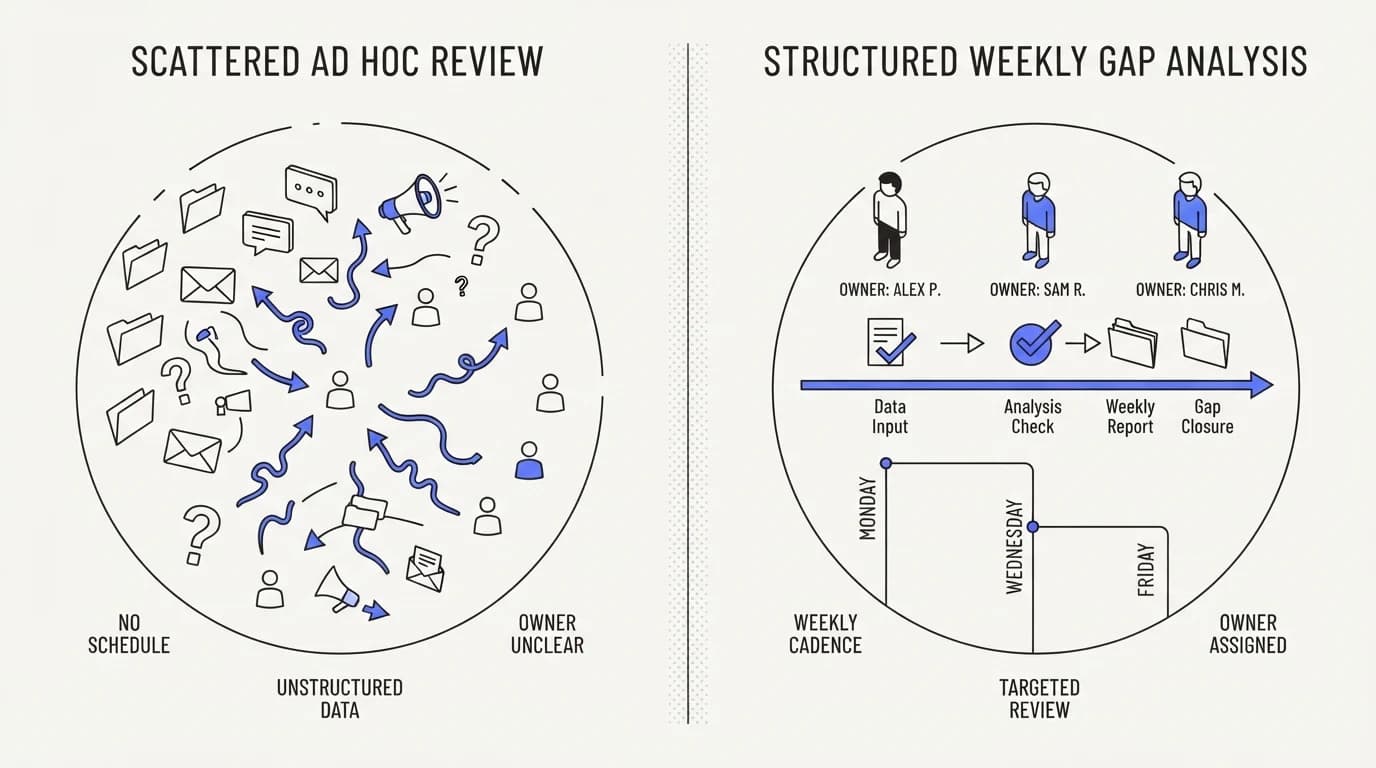
The difference between a team that occasionally glances at unanswered questions and one that runs the weekly procedure is structural, not a matter of effort.
| Practice | Ad hoc review | Weekly procedure |
|---|---|---|
| Fixed cadence with a named day and duration | ✗ | ✓ |
| Consistent gap taxonomy across weeks | ✗ | ✓ |
| Named owner for every open gap | ✗ | ✓ |
| Trend line comparable week over week | ✗ | ✓ |
| Aging gaps flagged and escalated | ✗ | ✓ |
| Confirms fixes reach the AI agent's grounding | ✗ | ✓ |
| Depends on one person remembering to check | ✓ | ✗ |
The rightmost row is the real risk of ad hoc review: it depends on one person's memory and workload, and it disappears the week that person is out sick or busy with a launch. A written weekly procedure survives turnover in a way a habit never does.
Where Communicate fits, honestly
Communicate's analytics dashboard logs every conversation the AI agent handles, including low-confidence answers and explicit handoffs into the shared inbox, which is the raw material the Monday pull in this guide needs. It does not run the weekly procedure for you; the triage, tagging, and ownership steps are a process your team runs, not a feature you turn on.
Closing a docs gap in Communicate means updating a connected data source, and the agent re-indexes on a schedule rather than instantly, so confirm the update actually reached the agent before marking a gap closed, the same check this guide names as the most common silent failure.
On honest limits, Communicate does not auto-generate product tickets or auto-classify a gap's root cause; the three-tag taxonomy in this guide is something your team applies, not something the product infers for you. If you want a fully automated gap-classification pipeline, that is a build project on top of the AI agent, not a shipped feature today.
Key takeaways
- Every question an AI agent cannot answer confidently is a labelled gap, already timestamped and written in the customer's own words, and most teams let it evaporate instead of mining it.
- Run a fixed weekly procedure: pull the past seven days of low-confidence, escalated, and repeated-rephrasing conversations every Monday, tag each by root cause, assign an owner, and close the loop by Friday.
- Sort every gap into exactly three categories: docs gap, product gap, or training gap, since each routes to a different owner and a different fix.
- Closing a docs gap in the help center is not done until the AI agent's connected sources actually re-index the change, the most common silent failure in a gap program.
- Track the weekly count as a trend line, not a single-week number, and escalate any gap still open after three weeks to a manager review.
Ready to see the low-confidence and escalated conversations your AI agent is already logging? Check the analytics dashboard for the past week's data, or activate an account for one dollar to start logging your own gaps from week one.
Frequently asked questions
What is a support knowledge gap analysis?
It is a recurring process of reviewing the questions an AI agent could not answer confidently, sorting them by root cause, and routing each to an owner who can close it. The output is a running list of documentation, product, and AI training gaps drawn directly from real customer questions rather than guesswork.
How often should I run a knowledge gap analysis?
Weekly. A monthly cadence lets gaps accumulate long enough that customers hit the same unanswered question repeatedly before anyone notices, and a daily cadence is usually more overhead than the volume justifies for most teams. Weekly, on a fixed day, is the cadence this guide's procedure is built around.
What counts as an unanswered question for this process?
Three categories: a low-confidence answer where the agent responded but the grounding was thin, an explicit escalation where the agent handed off to a human, and repeated rephrasing where a customer asked a version of the same question more than once. Define these three before your first weekly pull so the categorization stays consistent.
How do I pull the data for the weekly review?
Export the past seven days of conversations flagged as low-confidence, escalated, or rephrased from your analytics dashboard or your AI agent's conversation log, into a spreadsheet with columns for date, verbatim customer question, category, and the answer given. Keep the export format identical every week so trends are comparable.
How do I tell a docs gap from a product gap?
A docs gap is a question your product can already answer but your content does not cover. A product gap is a question that requires a feature, policy, or setting that does not exist yet. Routing a product gap to your help center writer wastes a week, since no article can document a feature that is not built.
What is a training gap in this context?
A training gap is a case where the correct answer already exists in your documentation, but the AI agent failed to retrieve or apply it. This usually points at a retrieval or connected data source problem rather than a content problem, and it is the category most worth investigating when escalations stay high despite thorough documentation.
Who should own the weekly gap review?
A support lead or support operations owner typically runs the Monday pull and initial tagging, since they have the fastest access to conversation logs. Ownership of individual gaps then splits across a help center writer, a product manager, and whoever maintains the AI agent's data sources.
How long should the weekly procedure take?
Budget about 90 minutes for the Monday steps: 30 minutes to pull the data, 45 minutes to tag root causes, and 15 minutes to sort and count. Ownership assignment and closing individual gaps happen later in the week and vary by volume.
What should I do with a gap that keeps recurring?
Track recurrence count explicitly in the spreadsheet. A product gap that shows up once might sit in a backlog for a quarter, but a gap that recurs ten or more times in a month is strong evidence for prioritization, and that count is the kind of concrete signal that moves a backlog item up faster than a single anecdote.
Why do hallucinations matter for a gap analysis program?
An unmined gap is where an AI agent is most likely to guess the next time the same question arrives, since nothing has been done to ground the missing answer. CMSWire found the share of organizations reporting a negative GenAI consequence rose from 44% in 2024 to 51% in 2025 (CMSWire), and a weekly gap review is one of the more direct ways to shrink that exposure over time.
What tools do I need to run this procedure?
A spreadsheet and access to your AI agent's conversation logs or analytics dashboard are the minimum. Nothing in the procedure requires specialized software, though a dashboard that already flags low-confidence and escalated conversations saves the manual step of identifying them.
How do I know a docs gap is actually closed?
Confirm the updated or new article has been re-indexed by the AI agent's connected sources, not just published to the help center. A fix that never reaches the agent's grounding will let the same gap resurface the next time a customer asks, even though the spreadsheet shows it as resolved.
What if my team does not have an AI agent yet?
The same process works on human agent transcripts, using tags like flagged, escalated, or customer had to ask twice in place of AI confidence signals. Once you deploy an AI agent, the low-confidence signal becomes available directly and speeds up the Monday pull.
How do I present the weekly gap report to leadership?
Show the trend line across at least four weeks, broken down by the three root cause categories, alongside the closed and deferred counts. A single week's snapshot is easy to dismiss; a month of consistent tracking with named owners and close rates is harder to argue with.
What is the biggest reason weekly gap analysis programs fail?
Skipping the named-owner step. A gap log with a root cause tag but no assigned person sits untouched, and a spreadsheet nobody owns stops being updated within a month, regardless of how well the first few weeks went.
How does escalation volume relate to knowledge gaps?
A rising escalation count with a flat or falling docs-gap count usually points at a training gap: the content exists, but the agent is not retrieving it correctly. Pair the weekly gap review with your escalation workflow metrics to catch this pattern early, since a training gap that goes unfixed for several weeks in a row tends to show up first as a slow rise in escalation volume rather than as an obvious spike, which makes it easy to miss without the two reports sitting side by side.
Should product gaps ever get fast-tracked outside the normal backlog?
Yes, when a single product gap accounts for a disproportionate share of weekly escalations or repeated rephrasing. A gap log that shows one missing feature behind twenty percent of a week's unresolved questions is strong enough evidence to request an out-of-cycle prioritization conversation.
How do I measure whether the weekly procedure is working?
Track three numbers over time: the total weekly gap count, the share closed within seven days, and the count of gaps still aging past three weeks. A working procedure shows a stable or falling total count and a rising close rate over a quarter.
What is the fastest category of gap to close?
Docs gaps, since the fix is usually a single article update with no dependency on engineering work, provided the AI agent's connected sources re-index promptly. Product gaps take the longest, since they depend on a broader roadmap and prioritization process outside the support team's direct control.
What should I do if the same gap keeps getting deferred every month?
Treat repeated deferral as a decision that needs to be made explicit rather than left implicit. Bring the recurring gap and its accumulated count to whoever owns the relevant roadmap, name the deferral out loud, and get either a committed timeline or an honest never, since a gap deferred silently forever still costs customers the same confusion each time it resurfaces.