
SaaS customer support AI: route on state, not volume
 Communicate.so
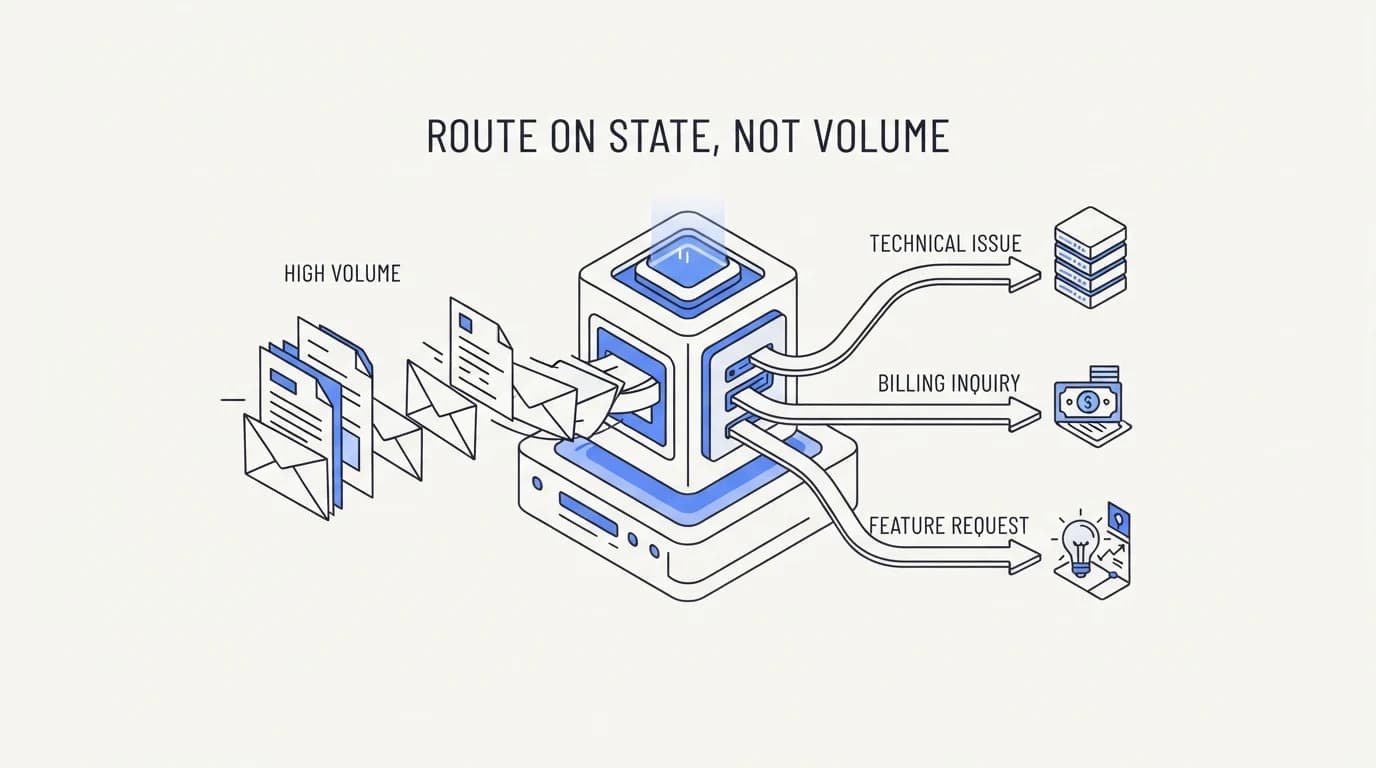
SaaS customer support AI works when you route by how-do-I versus it-is-broken, not by ticket volume. Here is how to build that split.
TL;DR: SaaS customer support splits into two structurally different categories, and most teams route on the wrong axis. The first category is how-do-I: a customer wants to know where a setting lives, how a feature works, or what a plan includes, and the answer sits in your documentation. The second category is it-is-broken: a customer is reporting an error, a stuck sync, or unexpected behavior tied to their specific account state, and no document contains that answer because the answer depends on what is happening in their account right now. An AI agent grounded in your help center resolves the first category well and should never guess at the second, because a fabricated explanation for a bug is worse than admitting uncertainty. The right design routes on that split, how-do-I versus it-is-broken, not on raw ticket volume or keyword matching, and getting the split right is what separates an agent that earns trust from one that erodes it the first time it invents a wrong answer.
Ask a SaaS support lead what their AI agent should handle and the first answer is usually a volume target: deflect forty percent of tickets, or handle the top ten questions. That framing sounds practical and misses the distinction that actually determines whether the agent helps or hurts, which is not how many tickets it touches but what kind of question each ticket actually is.
This guide is for the person deciding what a SaaS support agent should be allowed to answer on its own: a founder building support from scratch, a support lead handed an AI mandate, or an engineer wiring the agent into a product that changes weekly. It lays out the how-do-I versus it-is-broken split, why routing on volume instead of that split creates real risk, and what a working setup looks like on both sides.
The position here is specific. A grounded AI agent should resolve how-do-I questions directly from documentation and should escalate it-is-broken questions to a human by default, because state-dependent bugs need investigation an agent cannot fake its way through. Build the routing around that distinction first, and the ticket volume numbers take care of themselves.
The how-do-I category: documentation answers this
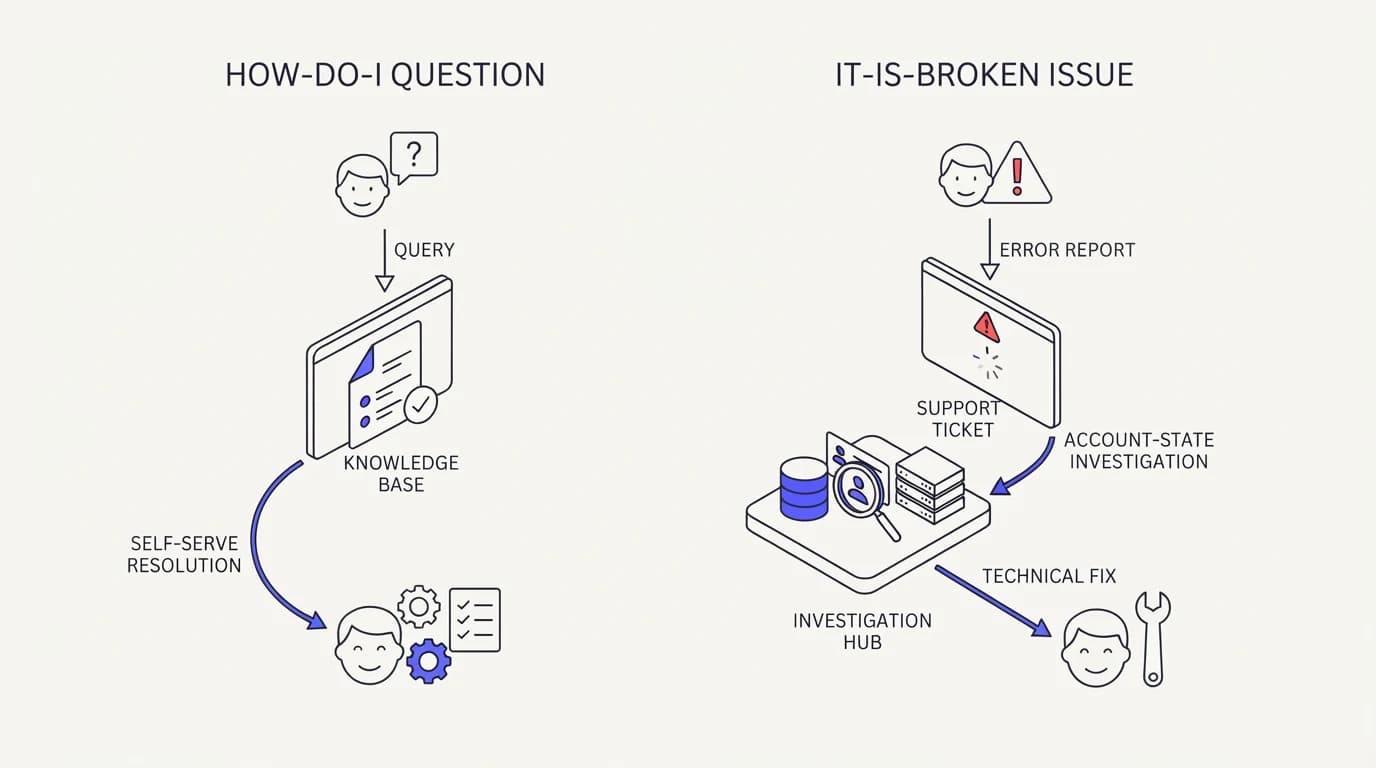
A how-do-I question asks about the product as it is designed to work. Where is the export button, how do I invite a teammate, what is included in the Pro plan, can I connect this to Slack. The answer is stable across every customer asking it, because the feature works the same way for everyone until you ship a change.
This is the category a RAG for customer support setup is built to handle well, because retrieval over documentation is exactly the right tool for a question with one correct, mostly static answer. The agent finds the relevant help article, states the answer, and links to the source, and there is nothing account-specific for it to guess at.
How-do-I questions are also the majority of what a new SaaS customer asks in their first weeks, before they have hit any actual friction with the product. Onboarding questions, plan comparisons, integration setup steps, and basic feature location all live here, and a well-maintained knowledge base resolves nearly all of it without a human touching the ticket.
The failure mode on this side is not usually wrong answers, it is stale ones. A help article describing a UI that shipped a redesign two months ago will confidently point a customer at a button that no longer exists in that spot, which is why keeping the agent's training data current matters as much as writing it well in the first place.
The it-is-broken category: state, not text, holds the answer
 Communicate.so
An it-is-broken question is fundamentally different, and treating it like a how-do-I question is where AI support does real damage. My sync stopped working, I got charged twice, this integration threw an error, my data disappeared. These are not requests for information that exists in a document.
They are reports that something in this specific account's current state does not match what it should.
No help article can answer why a specific customer's Salesforce sync failed at 3:47am on a Tuesday, because the cause is buried in logs, webhook delivery status, or a partial outage on a dependency, not in a static explanation of how syncing generally works. An agent that tries to answer anyway is not being helpful, it is filling a gap with a plausible-sounding guess.
This is the exact failure mode Twig documented when it studied common complaints about AI customer support tools: hallucinated answers, no clear escalation path, and a lack of context awareness rank among the most cited frustrations (Twig). A SaaS customer reporting a broken integration who receives a confident, wrong explanation for the bug loses more trust than one who is told plainly that a human is looking into it.
The right behavior on this side is not silence, it is honest triage. The agent should recognize the question as state-dependent, gather the specifics that will actually help a human diagnose it, such as the account, the integration, and the timestamp, and route the conversation to a person rather than attempt an explanation it cannot verify.
| Question | Category | Answer source | Should AI answer alone |
|---|---|---|---|
| How do I export my data | How-do-I | Documentation | ✓ |
| What does the Pro plan include | How-do-I | Documentation | ✓ |
| My Zapier sync stopped working | It-is-broken | Account logs, live investigation | ✗ |
| I was charged twice this month | It-is-broken | Billing system, account state | ✗ |
| How do I connect Slack | How-do-I | Documentation | ✓ |
| This API call returns a 500 error | It-is-broken | Server logs, live investigation | ✗ |
Read the table as the routing rule, not just an illustration. Anything answerable from documentation alone belongs to the AI agent by default, and anything that depends on the specific state of one customer's account belongs to a human, or to an agent that has been explicitly given the actions and account access needed to investigate rather than guess.
Why routing on volume instead of category backfires
 Communicate.so
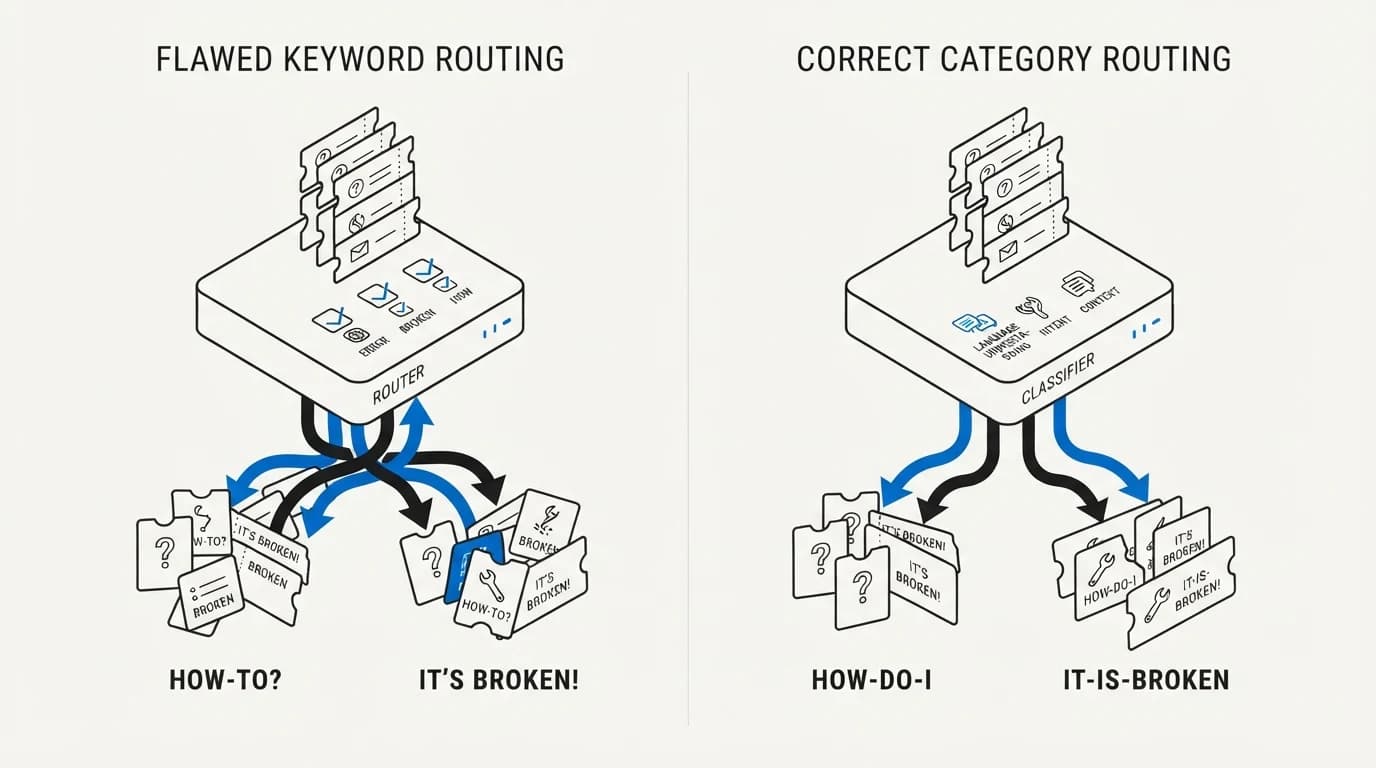
The instinct to route by ticket volume, automate the top ten most common questions, feels reasonable and misses the risk that matters. A frequent question is not automatically a safe one to auto-answer. If it-is-broken tickets about a specific integration spike because of a real outage, that spike is high volume and it is exactly the category the agent should not be guessing at.
Volume-based routing also tends to optimize for the wrong outcome, because it rewards the agent for handling whatever is common this week rather than whatever is safe to handle at all. A support team that measures success purely by deflection percentage can end up incentivized to let the agent attempt harder, riskier categories just to hit a number.
CMSWire's research on generative AI in customer service found that organizations reporting at least one negative consequence from GenAI deployment rose from 44 percent in 2024 to 51 percent in 2025 (CMSWire), and the pattern behind that rise is usually the same: an agent answering outside the category it should have been confined to.
Category-based routing avoids this because it is a stable rule regardless of how volume shifts. How-do-I questions stay safe to automate whether there are ten of them a day or a thousand, and it-is-broken questions stay unsafe to guess at regardless of how frequently the same integration keeps failing that week.
This is also where AI agent guardrails earn their keep specifically for SaaS support, because the guardrail that matters most is not a content filter, it is a category boundary the agent will not cross even when a plausible-sounding answer is one generation away.
Building the router: signals that separate the two categories
 Communicate.so
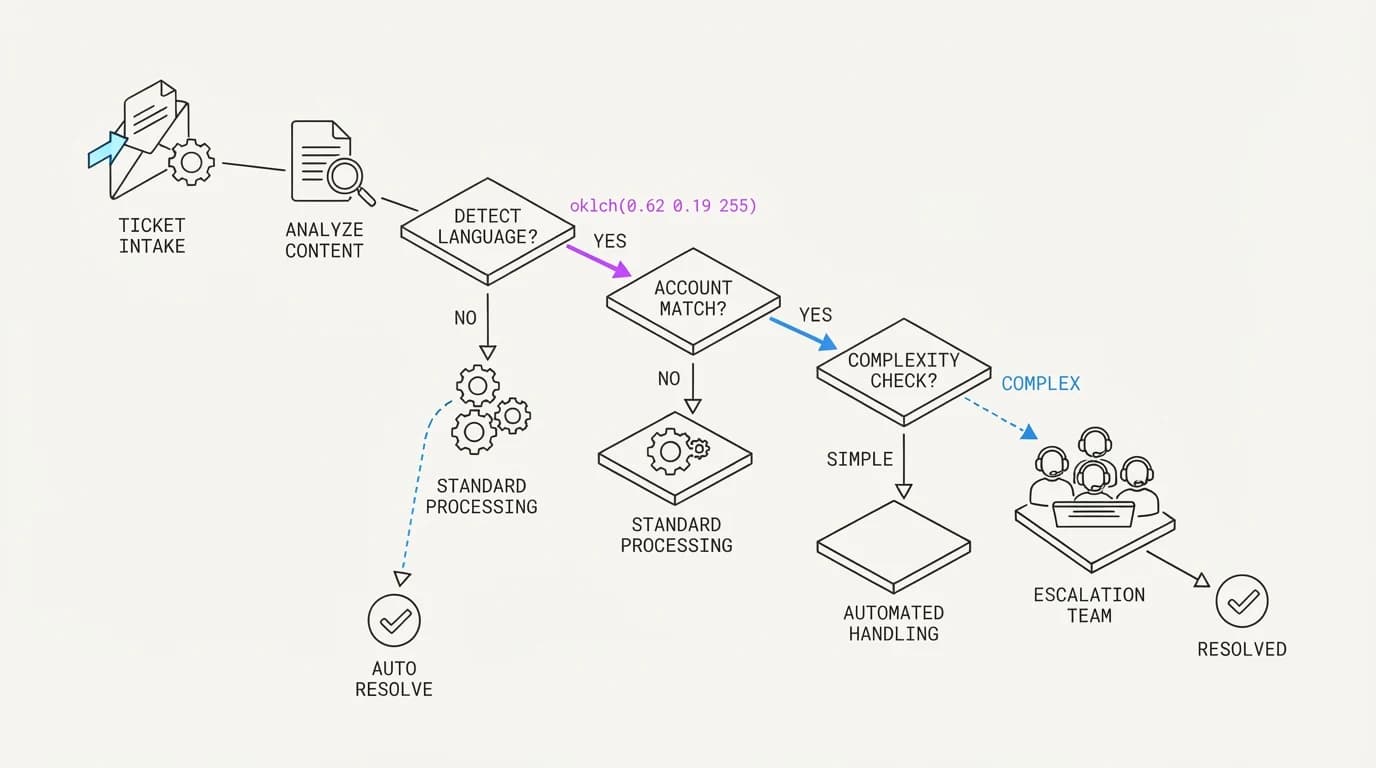
A working router does not need to be perfect, it needs to fail toward caution. The clearest signal separating the categories is whether the question references something specific to one account: an error code, a timestamp, a specific integration that is misbehaving, a charge amount. Generic phrasing, how do I, what is, can I, tends to signal a how-do-I question.
A second signal is emotional register. A customer reporting a break tends to write with urgency or frustration, mentioning that something used to work and now does not, which is a pattern distinct from a neutral how-do-I question asked before any friction occurred.
A third, more reliable signal is whether the answer requires reading current account state at all. If resolving the question needs a lookup into logs, billing records, or integration status through data sources, it belongs on the it-is-broken side by definition, regardless of how the question was phrased.
The failure mode to avoid when building this router is over-trusting keyword matching. A customer can phrase a genuine bug report as how do I fix this, which reads like a how-do-I question on the surface but is really an it-is-broken report wearing different words. The account-state signal is the tiebreaker when phrasing is ambiguous.
The escalation path: what a good handoff looks like
 Communicate.so
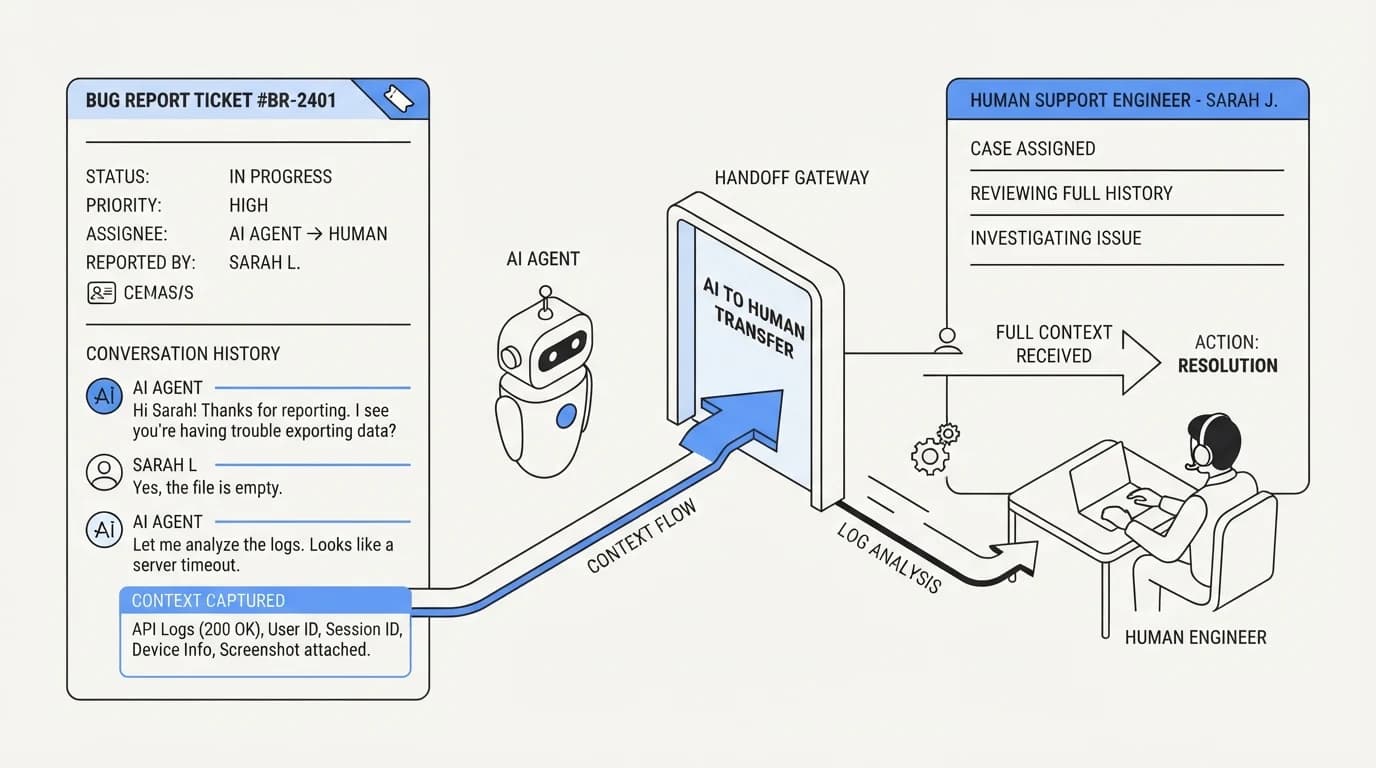
Getting the router right only matters if the escalation on the other side is clean. An it-is-broken ticket that gets correctly identified and then dumped into a generic queue with no context has solved half the problem and left the other half for the human to redo from scratch.
The escalation should carry the full conversation, whatever account details the customer already provided, and a plain statement of why the agent routed it to a person rather than answering. AI human handoff support covers the mechanics of keeping that handoff on one surface so the human is not starting cold.
A well-designed handoff also sets the customer's expectation honestly in the moment, rather than pretending the agent is still working on it. Telling a customer plainly that their issue needs a person to look into their account, with a rough sense of when that will happen, tends to land better than a vague we are looking into it that never clarifies who is actually looking.
Tone matters here too. A handoff message that reads as a form rejection, your ticket has been escalated, feels worse than one that names what happens next, such as an engineer is checking your account's sync logs now and will follow up here. The difference is small in wording and large in how the wait feels to the person on the other end.
There is also a feedback loop worth building deliberately: every correctly escalated it-is-broken ticket is evidence about what the router got right, and every misrouted one, an account-specific bug report the agent tried to answer directly, is evidence about where the category boundary needs to be tightened. Reviewing a sample of escalations weekly, rather than only auditing complaints, catches drift before it becomes a pattern customers notice, and it is a noticeably cheaper habit than discovering the drift only after a customer posts publicly about a wrong answer somewhere your own support team was not yet watching.
Documentation-grounded answers alone are not the finish line for a maturing SaaS support setup, but they are the correct starting boundary. How to build an AI customer support agent covers the broader build process if you are setting this up for the first time rather than tuning an existing router.
Multi-tier and multi-product SaaS: the split gets layered
 Communicate.so
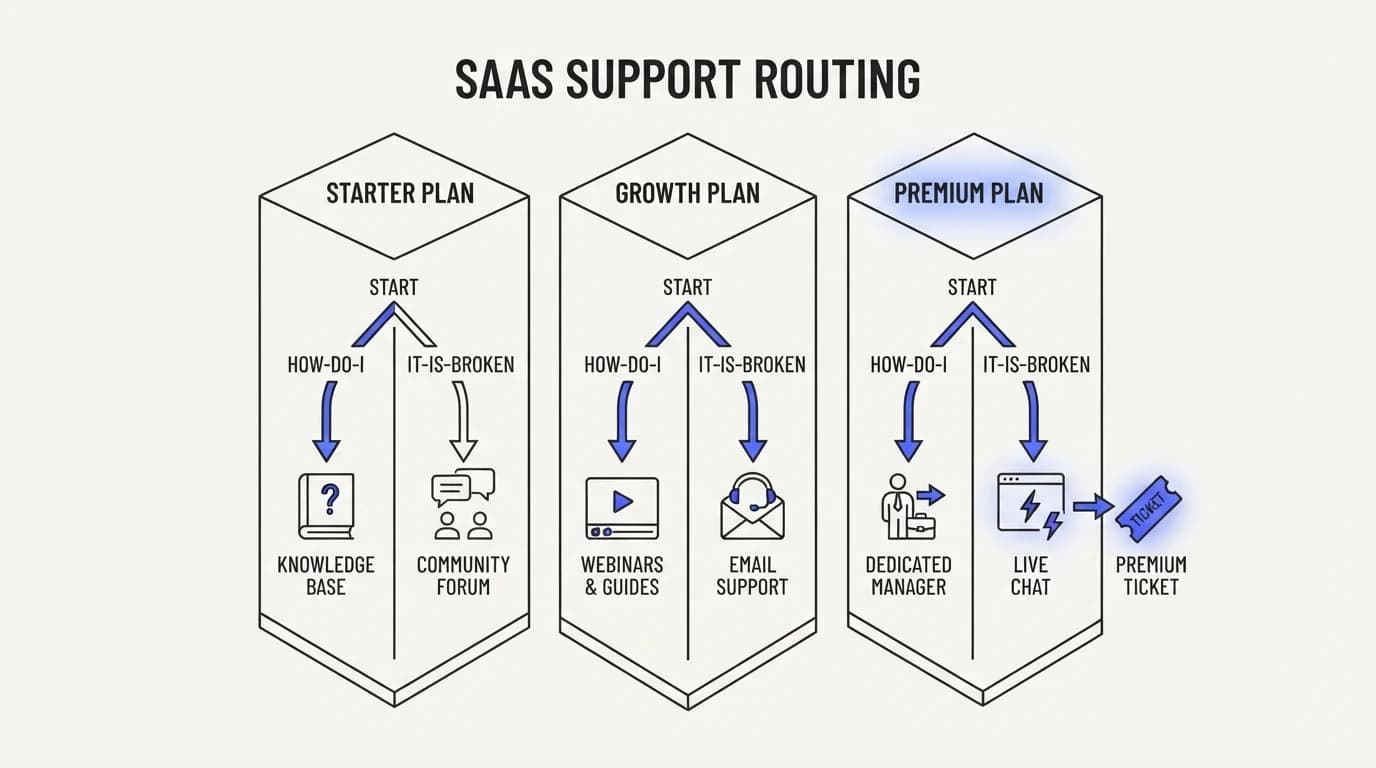
A SaaS product with multiple pricing tiers or several distinct products under one account adds a second axis to the routing decision, and it is easy to miss. A how-do-I question about a Pro-tier feature has a different correct answer than the same question asked by a customer on the free plan, because the feature may not exist for them at all.
This means documentation-grounded answers need plan awareness built in, not just topic awareness. An agent that tells a Starter-plan customer how to use a Pro-only export feature has technically answered a how-do-I question and produced a wrong, frustrating outcome anyway, because the button it described does not exist in that customer's account.
The fix is not more documentation, it is connecting the agent to the customer's actual plan and enabled features before it answers, the same account-awareness principle that governs the it-is-broken side of the split. Data sources covers wiring in that plan-level context alongside your help center content, and the same connection often gives the agent enough account signal to notice when a conversation has quietly shifted from how-do-I into it-is-broken partway through.
Multi-product accounts compound this further, since a customer asking about integrations may be asking about a completely different product's integration surface than the one support assumes by default. Scoping the agent's documentation retrieval to the product the customer actually has access to avoids answers that are correct for the wrong product and useless for the one in front of the customer.
None of this changes the core how-do-I versus it-is-broken split, it just means the how-do-I side is not always as static as it first appears. A stable answer for one tier can be the wrong answer for another, and a router that only checks topic without checking plan will get plan-gated questions wrong at a rate that looks like a documentation problem but is actually a context problem.
The same layering shows up when a company runs separate support queues for separate teams inside one customer organization, a pattern common in mid-market SaaS accounts with an admin, a billing contact, and several end users on the same subscription. An admin asking about seat management and an end user asking about a feature they cannot access may both be how-do-I questions in form, but the correct answer for one is not the correct answer for the other, and role awareness becomes a third layer on top of topic and plan.
Where Communicate fits, honestly
Communicate is a grounded AI agent that answers how-do-I questions from your connected documentation and escalates the rest through a shared inbox with presence-based human takeover, so a state-dependent bug report does not get a guessed explanation. The routing this guide describes is the default posture, not an opt-in setting you have to configure carefully to avoid.
Here is what it does without embellishment. It runs on a single model, gpt-4o-mini through OpenRouter, tuned for grounded retrieval rather than open-ended reasoning, and it answers from the content you connect and admits uncertainty rather than filling gaps.
On honest limits: Communicate does not read your application logs, billing system internals, or integration status by default, so an it-is-broken category still needs those connected through actions and data sources if you want the agent to investigate rather than only escalate. Out of the box, it escalates state-dependent reports to a human, which for most SaaS teams is the safer default until those deeper integrations are wired in. Entry is a one-time $1 activation with 100 test credits on the pricing page, enough to test the router against your real ticket history before trusting it live.
Key takeaways
- SaaS support splits into how-do-I questions, answerable from documentation, and it-is-broken questions, dependent on account state that no document contains.
- Routing by ticket volume instead of category is risky, because a frequent question is not automatically a safe one to auto-answer.
- The account-state signal, does resolving this require reading logs, billing, or integration status, is the most reliable tiebreaker when phrasing is ambiguous.
- A correctly routed it-is-broken ticket still needs a clean handoff that carries full context, not a dump into a generic queue.
- Default to escalating state-dependent reports until you have connected the account, log, and billing data an agent would need to investigate rather than guess.
If your queue mixes documentation questions with account-specific bug reports, start by connecting your help center through data sources and confirm the agent escalates state-dependent questions by default. A one-time $1 activation on the pricing page includes 100 test credits to run that check against your real tickets.
Frequently asked questions
What is the difference between how-do-I and it-is-broken support tickets?
A how-do-I question asks about the product as designed, and the answer is stable and documentable, like where a setting lives or what a plan includes. An it-is-broken question reports that something in a specific account's current state does not match expected behavior, like a failed sync or a duplicate charge, and the answer depends on data no document contains.
Why should an AI agent not try to answer bug reports directly?
Because the correct answer depends on account-specific state, such as logs or billing records, that a documentation-grounded agent cannot see. An agent that answers anyway produces a plausible-sounding guess rather than a diagnosis, and Twig's research on AI support complaints found hallucinated answers and poor context awareness rank among the most common frustrations with AI support tools (Twig).
Is routing by ticket volume a bad strategy for SaaS support AI?
It is risky as the primary strategy, because a question being common does not make it safe to automate. A spike in it-is-broken tickets about a real outage is high volume and exactly the category that should not be auto-answered, so volume alone is the wrong signal to route on.
What signals separate a how-do-I question from an it-is-broken question?
The clearest signal is whether resolving the question requires reading current account state, such as logs, billing records, or integration status through data sources. A secondary signal is specificity: mentions of an error code, a timestamp, or a charge amount tend to indicate a state-dependent report rather than a general question.
Can AI ever resolve an it-is-broken ticket without a human?
Yes, when the agent has been explicitly connected to the systems needed to investigate, such as integration status or billing records through actions. Without that connection, the safer default is escalation, because an agent guessing at a diagnosis is worse than one that admits it needs a person to look.
How does RAG help with SaaS how-do-I questions specifically?
Retrieval-augmented generation is well suited to how-do-I questions because the answer is a stable passage of text the agent can find and cite. RAG for customer support covers the mechanism in depth, and it is the right tool for exactly this category, not for account-specific state questions.
What happens if a SaaS support AI hallucinates an answer to a bug report?
It erodes trust faster than admitting uncertainty would have. CMSWire's research found organizations reporting a negative consequence from GenAI deployment rose from 44 percent in 2024 to 51 percent in 2025 (CMSWire), and a fabricated bug explanation is a common path into that statistic.
Should documentation quality affect how much AI can automate?
Directly. Stale documentation describing a redesigned interface will confidently point customers at buttons that no longer exist, so keeping the agent's training data current is as important as the routing logic itself for the how-do-I side of the split.
What does a good AI-to-human handoff look like for a broken feature report?
It carries the full conversation and whatever account details the customer already gave, plus a plain statement that the issue needs a person to investigate. AI human handoff support covers keeping that handoff on one surface so the human is not starting from zero.
How do guardrails apply to SaaS customer support AI?
The most important guardrail is a category boundary the agent will not cross, refusing to answer state-dependent questions even when a plausible response is one generation away. AI agent guardrails covers this pattern in more detail, and it applies directly to the how-do-I versus it-is-broken split.
Can a customer phrase a bug report like a how-do-I question?
Yes, and it is a common trap for simple routers. A customer might ask how do I fix this sync when they mean my sync is broken, which reads like a how-do-I question but is really an it-is-broken report. The account-state signal, whether answering requires current data rather than static text, is the reliable tiebreaker.
What is the risk of over-automating SaaS support?
The risk is not too much automation on the how-do-I side, it is automation bleeding into the it-is-broken side, where a confident wrong answer damages trust more than a slower correct one would have. Category discipline, not a lower automation percentage, is the actual fix.
Does AI reduce support headcount needs for SaaS companies?
It shifts headcount toward the harder category rather than eliminating it outright. Automating the how-do-I majority frees human time for it-is-broken investigation, which still needs a person with account and system access, so the realistic outcome is a support team spending more time on genuinely hard cases, not fewer people overall.
How should onboarding questions be routed?
Onboarding questions are almost always how-do-I in nature, since a new customer asking where a feature lives or what a plan includes has a stable, documentable answer. These are among the safest and highest-value questions to automate, because resolving them quickly shapes first impressions before any real product friction occurs.
What is the biggest mistake in building a SaaS support AI router?
Trusting phrasing alone instead of checking whether the answer requires live account state. A router built purely on keyword matching will misclassify bug reports phrased as questions, letting the agent attempt an answer it has no real basis for.
Should billing questions be treated as how-do-I or it-is-broken?
General billing questions, like what does the Pro plan cost, are how-do-I. Specific billing disputes, like I was charged twice, are it-is-broken, because the answer depends on that account's actual transaction history, not a static pricing page. The same question topic can fall on either side depending on whether it references a specific account event.
How does an AI agent avoid guessing at integration failures?
By recognizing that an integration failure is account-specific and either investigating through connected actions and logs, or escalating with the specifics a human needs, such as the integration name and approximate failure time, rather than offering a generic explanation of how the integration usually works.
Can AI support scale with a growing SaaS product?
The how-do-I side scales cleanly as documentation grows, since retrieval does not get harder with more content if the content stays organized. The it-is-broken side scales with product complexity in a different way, requiring deeper system connections as more integrations and account states exist to investigate, so the two sides of the split scale differently and should be planned for separately.
What is the honest limit of AI for SaaS technical support?
An agent without deep system access should not attempt to diagnose account-specific technical failures, full stop. The honest posture is documentation-grounded answers plus clean escalation by default, with deeper investigation added only once logs, billing, and integration status are actually connected through data sources.
How do I measure whether my SaaS support AI router is working?
Track two numbers separately rather than one blended deflection rate: resolution rate on how-do-I questions, and escalation accuracy on it-is-broken questions, meaning how often the agent correctly identifies a state-dependent report instead of attempting to answer it, then reviews a sample of each category by hand to confirm the automated split matches what a human reviewer would have decided. Analytics broken out by category is more useful here than an overall satisfaction score, because a healthy blended number can still hide a how-do-I side performing well while an it-is-broken side quietly answers questions it should have escalated.