
B2B customer support AI: why account context beats knowledge breadth
 Communicate.so
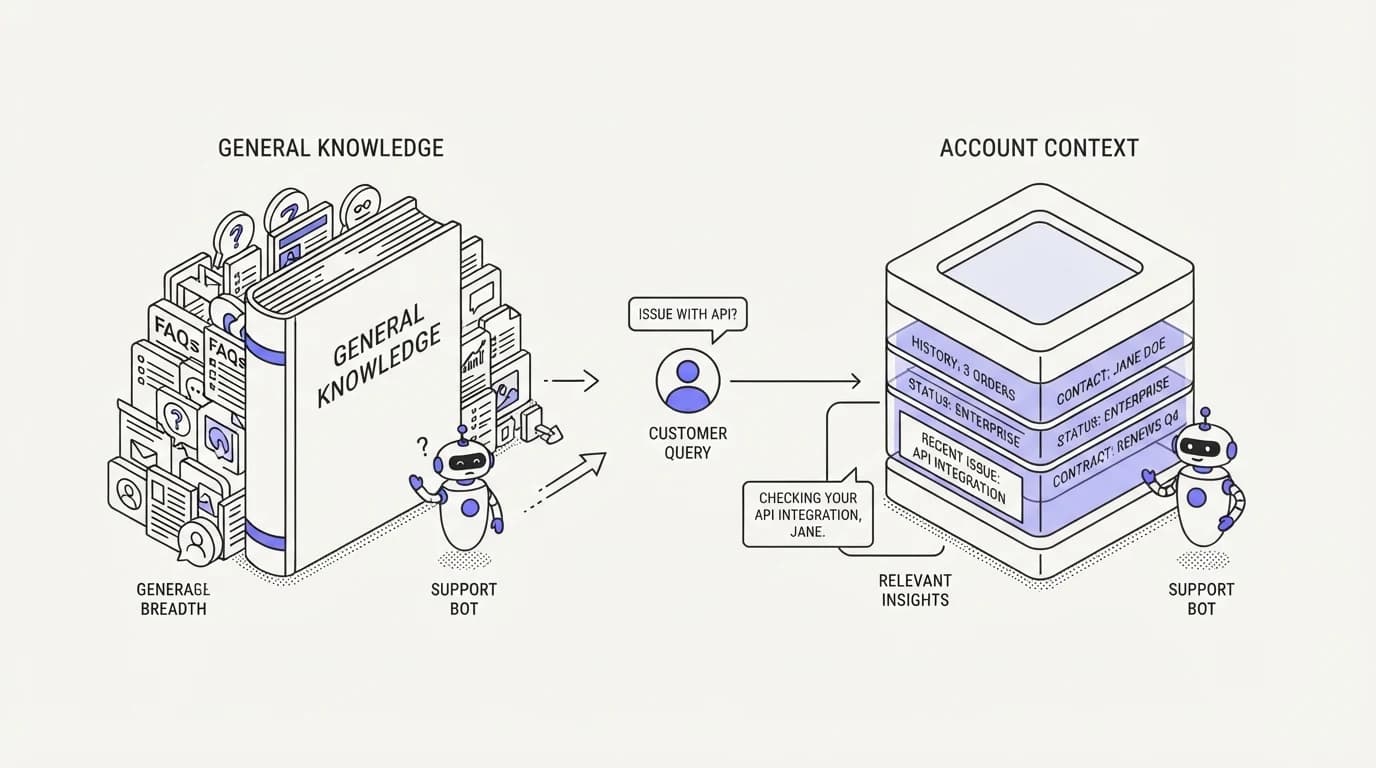
B2B customer support AI explained: why knowing which named account is asking matters more than covering more topics.
TL;DR: B2B customer support AI has a different failure mode than consumer support: the hard part is rarely covering enough topics, it is knowing which named account, plan, and contract is actually asking. A consumer agent can get away with generic answers because most consumer questions have the same answer for everyone. A B2B agent that ignores account context gives a customer on the legacy plan an answer written for the current one, or tells an enterprise account about a limit that only applies to self-serve customers. This guide argues that account context, not broader knowledge coverage, is the design priority for B2B support AI, and walks through what that means in practice: connecting the right account data, scoping answers to what a specific customer's plan and contract actually allow, and escalating to a named account owner instead of a generic queue when a question needs a person. The goal is an agent that answers correctly for the account in front of it, not one that knows a little about everything and nothing specific about anyone.
A consumer support bot and a B2B support agent look similar in a demo and behave very differently in production. The consumer bot can answer from one universal knowledge base, because most consumers are on the same plan asking the same handful of questions. A B2B AI agent is talking to a named account with a specific contract, a specific integration setup, and a specific history, and a generic answer is often a wrong answer wearing a right answer's confidence.
This guide is written for the person who owns support tooling at a B2B company: a support lead at a SaaS vendor, a customer success manager watching escalations pile up, or a founder scaling past the point where everyone on the team personally knows every customer. It argues for a specific design priority, account context over knowledge breadth, and shows what building for that priority actually looks like.
The position here is a direct one. If you have to choose between an agent that knows more topics in general and one that knows exactly which plan, contract, and integration state the account in front of it has, choose the second every time. Breadth without context produces confident, generic, occasionally wrong answers to the exact customers who can least afford one.
Why B2B support is an identity problem before it is a knowledge problem
Consumer support questions cluster around a small set of universal answers: how does the return policy work, what is the shipping timeline, how do I reset my password. The same answer is correct for nearly every customer asking, which is exactly why a broad, generic knowledge base performs well in consumer contexts.
B2B questions rarely work that way. A question like 'why did my integration stop syncing' has a different correct answer depending on which integration the account uses, which plan tier gates which features, and what custom configuration a solutions engineer set up during onboarding. Answering it well requires knowing who is asking before you can even start answering what they asked, which is a different problem than the one customer support automation solves for a consumer queue.
This is why a B2B support agent that only has broad product knowledge, without account-specific context, tends to produce answers that are technically accurate in general and wrong for the specific customer. It might describe a feature the account's plan does not include, or a default behavior the account's custom configuration overrides. The mistake reads as carelessness even when the underlying knowledge base was correct.
Account context: what the agent needs to know about who is asking
 Communicate.so
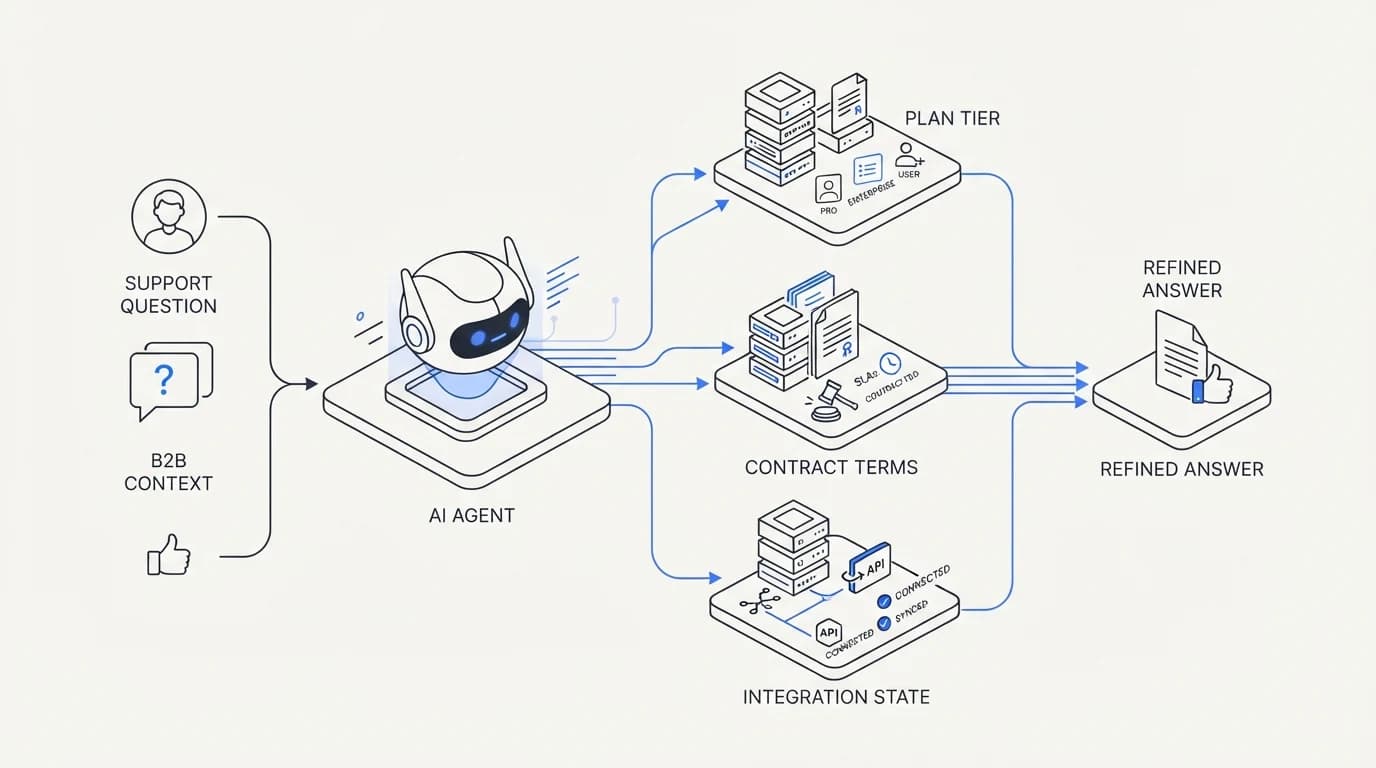
Account context is the specific set of facts about a customer that changes which answer is correct. For most B2B products, that set includes plan tier, contract terms, active integrations, seat count, custom configuration, and support tier or SLA level. None of this is exotic data, most of it already lives in a CRM, billing system, or product database somewhere in the company.
The gap is rarely that this data does not exist. It is that support tooling was never wired to read it, so a support agent, human or AI, answers from general product knowledge instead of the specific account's actual state. A support rep who has worked an account for years compensates for this by memory.
An AI agent has no memory unless you give it the data explicitly.
Connecting account data through data sources turns a generic agent into an account-aware one. Instead of answering 'here is how the integration generally works,' the agent can answer 'here is how your Salesforce integration, on your current plan, with the custom field mapping your team set up, is behaving,' which is a fundamentally more useful and more accurate answer.
Named accounts vs anonymous users: comparison table
The distinction between a named-account model and an anonymous-user model shapes almost every design decision in B2B support. The table below lays out where each model needs different handling, because treating a named enterprise account like an anonymous consumer, or the reverse, is where most B2B support agents go wrong.
| Support design need | Anonymous consumer model | Named B2B account model |
|---|---|---|
| Answers depend on which plan the requester is on | ✗ | ✓ |
| Same answer correct for nearly all requesters | ✓ | ✗ |
| Contract or SLA terms affect the correct answer | ✗ | ✓ |
| Custom integration configuration affects the answer | ✗ | ✓ |
| A single generic knowledge base is usually sufficient | ✓ | ✗ |
| Escalation should route to a specific named contact | ✗ | ✓ |
Read the table as a warning against copying consumer support patterns into a B2B product wholesale. The tooling, the vendors, and the playbooks built for high-volume, low-context consumer support optimize for exactly the row that a B2B queue does not have: one answer that fits nearly everyone.
Data sources: connecting CRM, contracts, and usage data safely
 Communicate.so
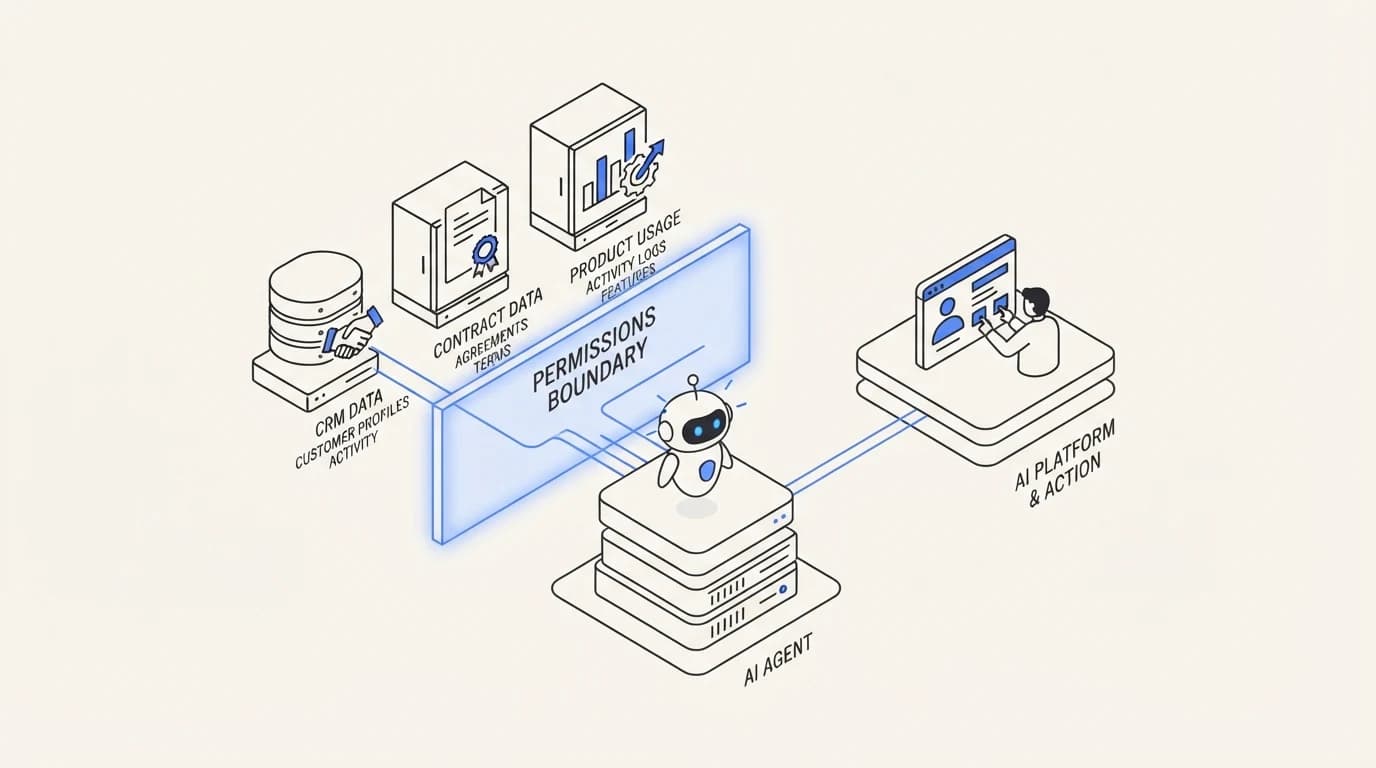
Connecting account data is where the real engineering work in B2B support AI actually lives, and it deserves the same care as any integration touching customer records. The goal is giving the agent read access to the account facts it needs, plan tier, contract terms, integration state, without exposing data across accounts or granting write access it does not need.
Start with the data that most directly changes which answer is correct: plan tier and feature entitlements, contract-specific terms like custom SLAs or data retention agreements, and the account's specific integration and configuration state. Usage data, like which features an account actively uses, is useful for prioritization but rarely changes what the correct policy answer is.
Scope access per conversation to the account the customer is actually authenticated as, not to your full customer database. An agent that can see every account's data to answer one customer's question is a security problem waiting to surface, and the discipline here is the same one covered in AI agent guardrails: bound what the agent can reach, not just what it is told to look at.
Scoping answers to plan, contract, and integration specifics
Once account data is connected, the agent's job shifts from general product explanation to specific account diagnosis. A question about API rate limits should pull the actual limit for that account's plan, not the number from the pricing page, if the account has a custom contract term overriding the default.
This is where grounding matters as much for B2B as it does anywhere else. The agent should answer from the account's actual entitlements and configuration, retrieved at the moment of the question, the way RAG for customer support grounds any agent in current, correct source material rather than a static, possibly stale assumption.
Where account data conflicts or is incomplete, the agent should say so rather than guessing at the more common case. A support agent that defaults to 'most accounts on this plan have X' when it actually cannot confirm this specific account's state is making the same confident-guess mistake that damages trust in any support context, just with higher stakes because the customer is often a paying enterprise account, not an anonymous consumer.
Legacy plans deserve special attention here, because a company that has been selling for several years usually has customers on discontinued plans with grandfathered terms that no longer appear anywhere in current pricing documentation. An agent trained only on the current pricing page will confidently misdescribe a legacy account's actual entitlements, which is a narrower version of the same hallucination risk covered in reducing AI hallucinations in support, specific to B2B account history rather than general product facts.
The practical fix is treating historical plan and contract data as a first-class source alongside current documentation, not an edge case to handle manually when it comes up. A B2B company with five years of contract history has, in effect, five years of exceptions layered on top of its current pricing page, and an account-aware agent needs access to that layered history to answer correctly for an account that predates the current terms.
Escalation to a named account owner or CSM
 Communicate.so
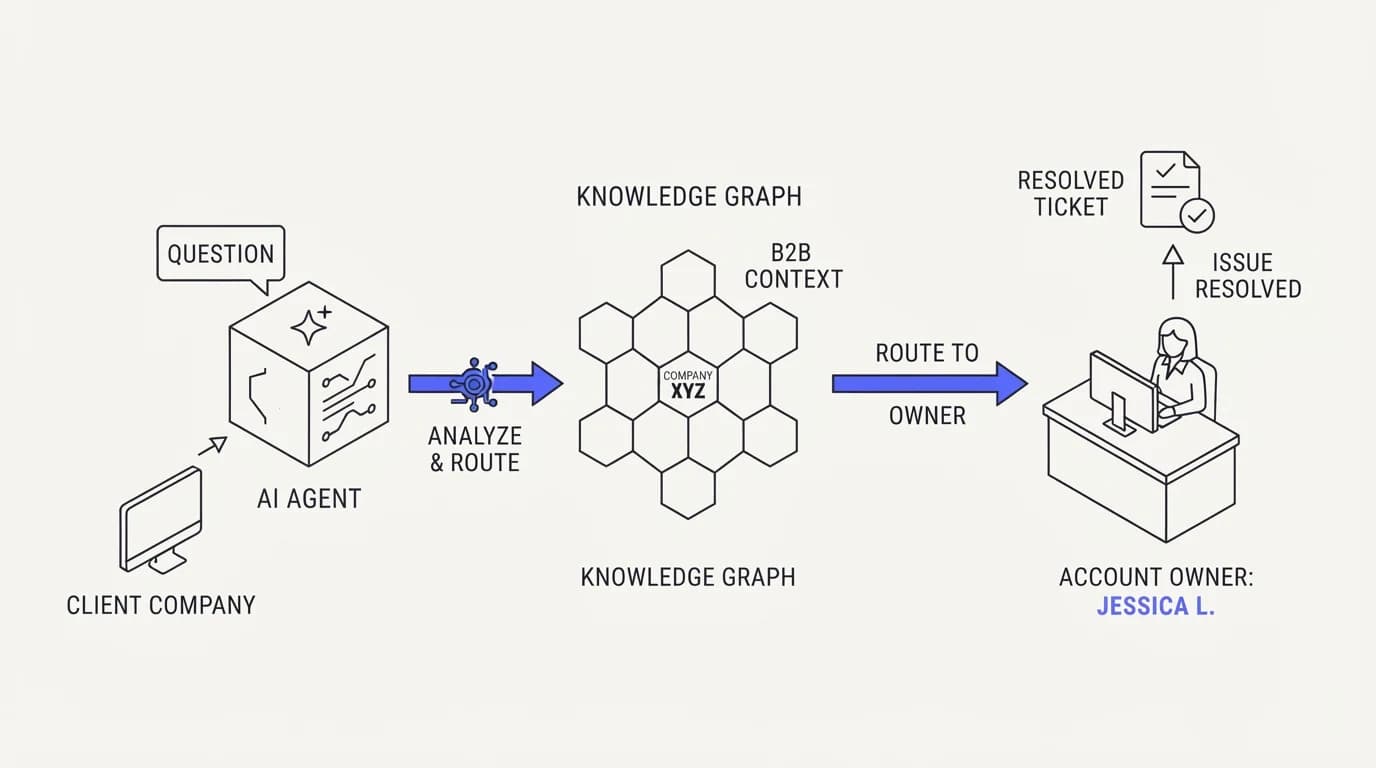
Escalation in B2B support should route to a person, not a queue, whenever the relationship has a named owner. A generic support escalation puts an enterprise account's question behind whoever happens to be free, while an account-aware escalation routes it to the customer success manager or account owner who already knows the account's history and stakes.
This matters more in B2B because the relationship itself carries context a fresh agent does not have: renewal timing, prior escalations, the specific stakeholder's role and technical depth. A clean support escalation workflow for B2B accounts should preserve that routing intelligence, not flatten every account into the same generic queue an AI agent could not resolve.
The AI agent's job in this handoff is narrower than in a consumer context: resolve what it can from account data and documented policy, and hand off everything else with enough context that the named owner does not have to reconstruct the situation from scratch. A clean handoff that carries plan, contract, and conversation history saves the account owner the first five minutes of every escalated call.
SLAs and enterprise expectations in B2B support
Enterprise B2B accounts often come with contractual response and resolution time commitments, and an AI agent changes what those commitments actually require to meet. If a contract promises a one-hour first response, the agent's job is either to resolve the question within that window or to guarantee a human response inside it, not to silently let the clock run while it works through a generic knowledge base.
Tracking this separately from your general support metrics matters, because a blended first response time average across your whole customer base can look healthy while your highest-value, SLA-bound accounts are quietly being underserved. Segment your reporting by account tier so an enterprise SLA breach never hides inside a good overall number.
The mechanism that makes SLA compliance realistic with AI in the loop is the same account-context principle running through this whole guide: the agent needs to know an account has an SLA at all, and what it promises, before it can help meet it. An agent blind to contract terms cannot prioritize a response it does not know is time-bound.
Deflection numbers are a useful backdrop for setting expectations about how much of an SLA-bound queue AI can realistically absorb. Deflection benchmarks reported by Lorikeet put an enterprise median around 41.2%, and HappySupport reports a range of 45 to 60% in year one climbing to 65 to 75% at maturity across industries, figures that give a B2B team a grounded target rather than a vendor's marketed number for how much SLA-relevant volume an agent should realistically clear on its own.
Multi-stakeholder accounts: who gets to ask what
 Communicate.so
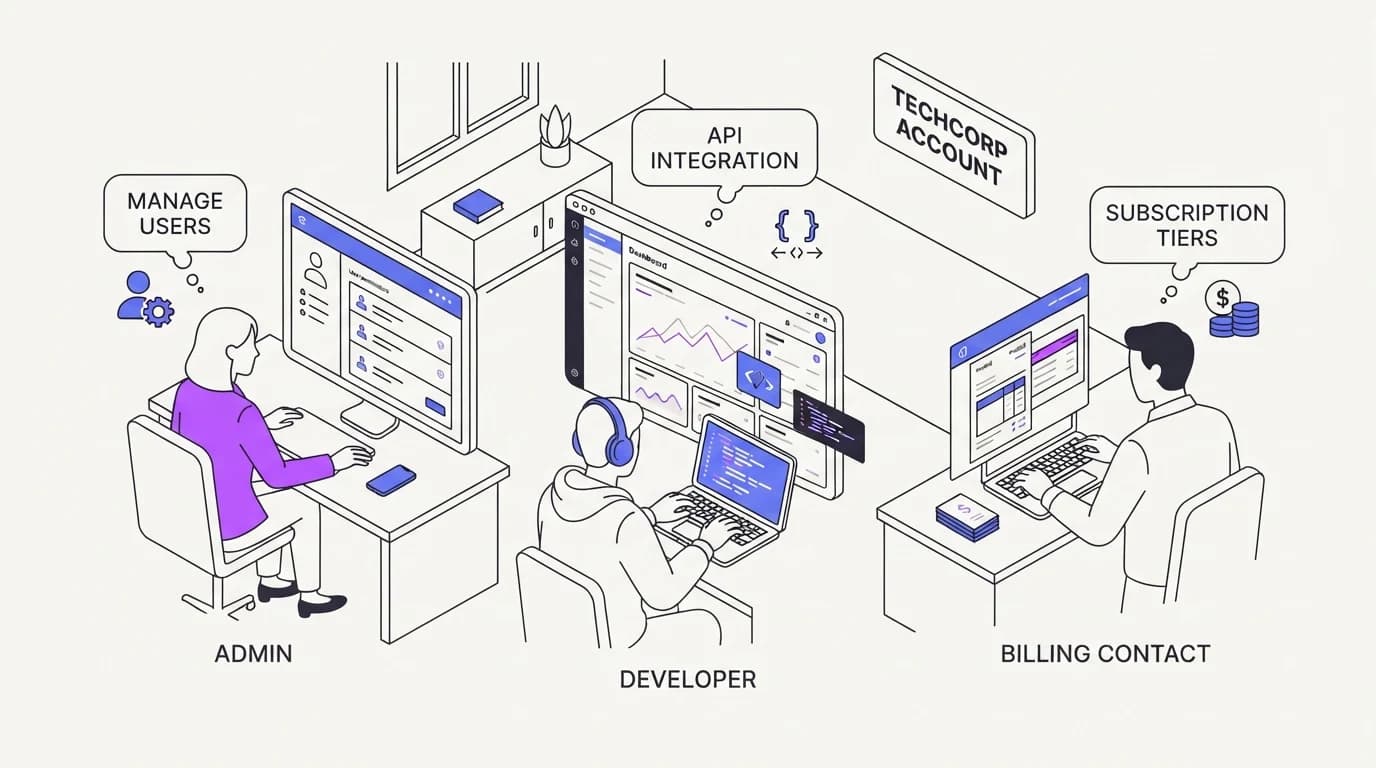
A single B2B account is rarely one person. An admin asks about billing and seat management, a developer asks about API behavior and rate limits, and an end user asks how to use a specific feature. Each stakeholder needs a different scope of answer, and some questions, like billing changes, should only come from an authorized contact on the account.
Design the agent to recognize stakeholder role where your product already tracks it, and to scope sensitive actions, like changing billing details or adding seats, to the roles authorized to request them. This is not just a UX nicety, it is a real access control question once an AI agent starts taking actions on an account rather than just answering questions.
The same principle extends to what the agent volunteers, not just what it acts on. A developer asking a technical question about webhook retries does not need to hear about the account's billing status, and an admin asking about invoicing does not need a deep technical explanation of retry logic. Matching the answer's depth and subject to the asker's actual role keeps every response useful instead of generic, and it is a smaller version of the same account-context discipline that runs through the rest of this guide.
Where an agent takes real actions on an account, resetting a configuration, updating a webhook, applying a credit, those should be explicit, scoped, and reversible, the model covered in actions. A developer asking a support agent to touch production configuration is a different risk profile than an admin asking about their invoice, and the agent's permissions should reflect that difference explicitly rather than treating every authenticated user the same.
Where Communicate fits, honestly
Communicate is a grounded AI agent that answers from content and data you connect, which for a B2B deployment means plan, contract, and account-specific documentation alongside your general product knowledge. The shared inbox keeps AI and human agents on one surface, so escalation to a named account owner carries full context rather than starting a fresh ticket.
Here is what it does without embellishment. It runs a web widget, live chat, and email through one agent and one knowledge base, with scoped actions and analytics from the same surface, so behavior is consistent whether a question comes from an admin, a developer, or an end user at the account.
On pricing, entry is a one-time $1 activation with 100 test credits, then usage-based credits, detailed on the pricing page, which tends to suit a B2B support volume that scales with account count rather than a flat per-seat model. Connect your account and contract data through data sources before testing it on your highest-context, most account-specific real questions, the ones that actually separate a good B2B support agent from a generic one.
Key takeaways
- B2B support is an identity problem before it is a knowledge problem, because most B2B questions have different correct answers depending on which specific account is asking.
- Account context, plan tier, contract terms, and integration state, matters more than broad topic coverage for producing correct B2B support answers.
- Escalation should route to a named account owner or customer success manager with full context, not into a generic queue.
- SLA-bound enterprise accounts need segmented tracking, since a blended response-time average can hide a breach on your highest-value accounts.
- A single account often has multiple stakeholders with different scopes, and sensitive actions should be gated to the roles authorized to request them.
Ready to scope an AI agent that actually knows which account is asking? Start with a one-dollar account activation that includes 100 test credits, connect your account and contract data through data sources, and test it on your real, highest-context B2B questions before it goes live.
Frequently asked questions
Why is B2B customer support different from consumer support?
Because most B2B questions have a different correct answer depending on which specific account is asking, driven by plan tier, contract terms, and integration configuration, while most consumer questions have one correct answer for nearly everyone. A generic AI agent built for consumer support volume tends to give confidently wrong answers when applied to B2B accounts without that context.
What is account context in B2B customer support AI?
Account context is the specific set of facts about a customer, plan tier, contract terms, active integrations, seat count, and support tier, that determines which answer is actually correct for them. Without it, an agent answers from general product knowledge that may not match the account's real, current state.
Does an AI agent need CRM access to support B2B accounts well?
It needs read access to whatever data actually changes the correct answer for an account, which is often plan and contract data from a CRM or billing system alongside product configuration data. Connect it deliberately through data sources rather than granting broad database access the agent does not need.
How do I scope AI agent data access safely across multiple accounts?
Scope access per conversation to the specific account the customer is authenticated as, never to your full customer database. This is the same principle behind AI agent guardrails: bound what the agent can technically reach, not just what you instruct it to look at, so a scoping mistake cannot expose another account's data.
Should B2B support escalations go to a general queue or a named owner?
A named owner whenever the relationship has one. An account's customer success manager or account owner already carries context, renewal timing, prior issues, stakeholder relationships, that a generic queue discards. A support escalation workflow built for B2B accounts should preserve that routing rather than treating every account the same.
How does an SLA change how an AI agent should handle a B2B ticket?
An SLA-bound account needs either a resolved answer or a guaranteed human response inside the contracted window, so the agent needs to know the SLA exists and what it promises before it can help meet it. Track first response time separately for SLA accounts, since a blended average across your full customer base can hide a breach on your highest-value accounts.
Can different people at the same B2B account get different AI agent responses?
Yes, and they should when their roles differ. An admin asking about billing, a developer asking about API behavior, and an end user asking how to use a feature each need a different scope of answer, and sensitive requests like billing changes should only be honored from an authorized contact on the account.
What data should never be exposed to a B2B support AI agent?
Data outside the scope of the account actually asking, and any credentials or secrets that would let the agent take unreviewed actions beyond what it is explicitly authorized to do. Treat account data access the same way you would treat any integration with customer records, with the narrowest scope that still answers real questions correctly.
How is B2B AI support different from an enterprise helpdesk?
A helpdesk organizes tickets, statuses, and routing rules, while account-aware AI support focuses on whether the answer itself is correct for the specific account asking. The two are complementary rather than competing, and many B2B teams run a shared inbox with account-aware AI alongside a heavier system for enterprise-scale ticket tracking.
Can AI take real actions on a B2B account, not just answer questions?
Yes, when scoped explicitly, such as resetting a configuration or applying a documented credit, the model covered in actions. Those actions should be reversible where possible and gated to the roles authorized to request them, since an action mistake on a B2B account carries more weight than a wrong FAQ answer.
How do I onboard an AI agent into an existing B2B support workflow?
Start by connecting your general product knowledge, then layer in account-specific data sources: plan entitlements, contract terms, and integration configuration. An onboarding checklist built for a B2B deployment should treat account-data connection as a distinct, deliberate step, not an afterthought bolted onto a generic FAQ import.
What happens if a B2B AI agent answers from the wrong plan tier?
The customer gets an answer that sounds authoritative and is wrong for their actual contract, which is often worse than no answer at all in a B2B relationship where trust and precision matter to the account's own business. This is the core argument for prioritizing account context over general knowledge breadth in any B2B support deployment.
Do B2B customers expect 24/7 AI support the same way consumers do?
Expectations vary more by contract than by default assumption. Some enterprise accounts have SLAs that effectively require always-on coverage, while others operate within specific business hours tied to their own team's schedule. Confirm what your contracts actually promise rather than assuming a consumer-style always-on expectation applies uniformly.
How do I measure whether account-aware AI support is working?
Track deflection and resolution rate segmented by account tier, not blended across your whole base, since a generic average can mask poor performance on your most complex, highest-context accounts. Analytics broken out by plan or contract tier shows whether the agent is actually handling account-specific complexity or just resolving the easy, generic questions.
Can a B2B support AI agent replace a customer success manager?
No, and it should not try to. A CSM carries relationship context, strategic account knowledge, and judgment an AI agent does not have, and its job is to resolve the repetitive, account-data-answerable questions so the CSM can spend time on the relationship and the complex cases. The two roles are complementary, not competitive.
How do I migrate B2B support from a legacy helpdesk to an AI-aware system?
Treat it as two migrations, not one: moving the ticketing and workflow layer, and separately connecting account-specific data sources the old system may never have used. A guide like migrating from Zendesk to AI covers the workflow side, and the account-context work described in this guide is the part specific to B2B that a generic migration checklist tends to skip.
What is the biggest mistake companies make deploying AI for B2B support?
Treating it like a consumer deployment: training the agent on general product documentation and skipping the harder work of connecting account-specific plan, contract, and configuration data. The result is an agent that sounds confident and answers a meaningful share of B2B questions incorrectly for the specific account asking, which is the exact failure this guide argues account context prevents.
Does AI support work for B2B companies with only a handful of large accounts?
Often especially well, because a small number of high-value, well-documented accounts is exactly the setting where deep account context pays off most. With few enough accounts, connecting detailed contract and configuration data through data sources is manageable, and the accuracy gain matters more per account when each one represents significant revenue.
How much does B2B AI customer support cost compared to adding support headcount?
It depends heavily on account volume and complexity, and the honest comparison should weigh usage-based AI pricing against the fully loaded cost of additional support and CSM headcount for the same volume, a comparison covered in more depth in AI customer support cost. For most B2B teams, AI reduces the repetitive share of the load rather than replacing headcount outright, freeing existing staff for account-specific work.
Should a B2B AI agent behave differently for a trial account than a paying enterprise account?
Yes, and the difference should follow the same account-context principle as everything else in this guide. A trial account typically has narrower entitlements and no contractual SLA, while an enterprise account may have custom terms, a named owner, and a response-time commitment, so the agent's answers and escalation behavior should reflect whichever account is actually asking rather than a single default treatment, the same distinction covered when comparing shared inbox and human handoff design for different account tiers.